



Copy link to clipboard
Copied
I'm using Adobe Captivate 8. What should I do to get the entire title to fit into the TOC instead of resorting to a ....
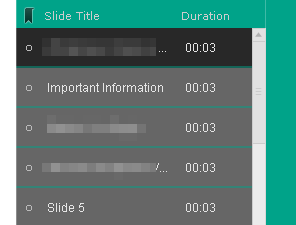
Thanks


 1 Correct answer

If you remove the timings, you will have more room for the title. In addition, you can adjust the width of the table of contents. It's default is 250. I've actually bumped it up to 300 on a number of occasions. Finally, think about ways to shorten the title, for example using '&' instead of 'and', etc.
I think if you use a number of these approaches, you will find your titles fit much better.
The screenshot below shows where to adjust the width. This is a screenshot from Captivate 8 since that
...
 4
Replies
4
4
Replies
4

Copy link to clipboard
Copied
If you remove the timings, you will have more room for the title. In addition, you can adjust the width of the table of contents. It's default is 250. I've actually bumped it up to 300 on a number of occasions. Finally, think about ways to shorten the title, for example using '&' instead of 'and', etc.
I think if you use a number of these approaches, you will find your titles fit much better.
The screenshot below shows where to adjust the width. This is a screenshot from Captivate 8 since that is what you asked about.
Hope this answers your question.
CHUCK

Copy link to clipboard
Copied
Thanks! By the way, how do I change the color of the font for the TOC title?

Thanks again
Copy link to clipboard
Copied
That's one I could never figure out in Captivate 8. I remember struggling with it and never did find a solution for changing the color of words "Table of Contents" at the very top of the panel. I have not tried that in Captivate 2017 yet, so I'll be interested to see if I can change the colors.
CHUCK

Copy link to clipboard
Copied
Third possibility is to decrease the font size. But I plead for shortening
the item titles. Wil be better for learner!


Get ready! An upgraded Adobe Community experience is coming in January.
Learn more
 AdChoices