
Known Participant
December 12, 2014
Question

Fix Chrome? CP opens in a small window with a scroll bar

  • December 12, 2014
  • 2 replies
  • 687 views

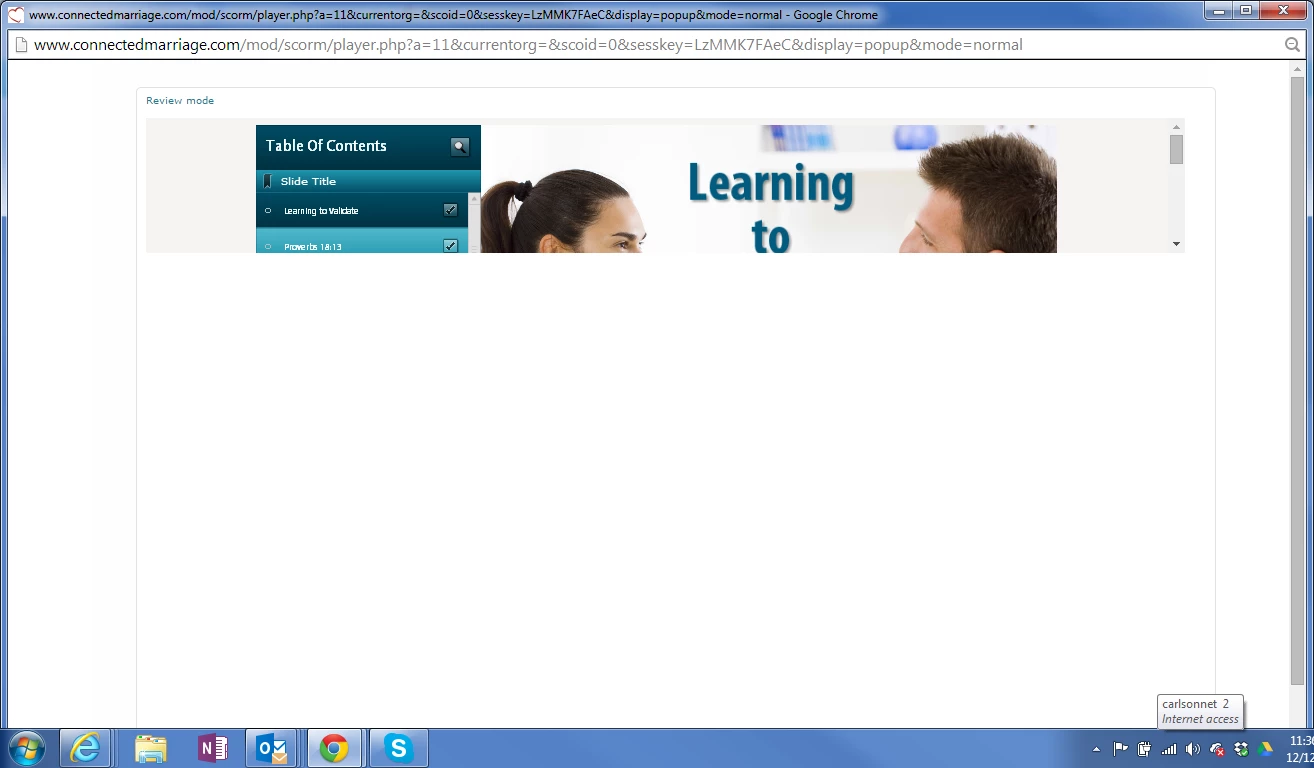
I have CP presentations that previously worked and they have started to open funny. They work in IE, but not in Chrome. The presentation opens in a full screen, but with a scroll bar and the right and only showing about 1/4 of the screen. See attached screen shot. Any ideas?
    This topic has been closed for replies.

    2 replies

    xr42nv
    Inspiring
    December 14, 2014

    So it could be 2 things:

    The HTML scaling that is causing your project to expand, and then add a scrollbar as the frame you are viewing your content in is expanding to suit the screen size. When you publish try unchecking the "Scalable HTML Content" checkbox from the publish settings.

    It could be the projects Zoom settings, if it is a flash module. Just right click and ensure its not zoomed.

    The thing that has me stumped is why it is only loading 1/4 of the screen.

    Participating Frequently
    December 12, 2014

    Hi There ,

    Can you tell me the version of Captivate you are using? Also try to clear the cookies and history of chrome browser and check again.

    Regards,

    Mayank

    Known Participant
    December 12, 2014

    I cleared the cookies and the browsing history. I have presentations using both CP 7 & 8. I'm still running into the problem.

    Known Participant
    December 19, 2014

    Hi There,

    Can you check if your Captivate 8 is updated to Cp 8.0.1 ? If not please update it and check again. Are you viewing the published output locally or uploading it to LMS or any Server ? Are you able to reproduce it on any other machine as well using Chrome?

    Regards,

    Mayank


    I've discovered that this is a Chrome bug. It should be fixed in the next update.

    http://code.google.com/p/chromium/issues/detail?id=414532

    If a user resizes their window, it will open.