
Inspiring
July 29, 2010
Answered

full screen capture

  • July 29, 2010
  • 4 replies
  • 1880 views

Using Captivate 5, I need to create a project that captures Full Screen. Everything on the monitor needs to be part of the capture. My monitor is set to display at 1024 x 768. Captivate is set to 1024 x 768 Full Screen. When capturing the slides, I am not scrolling. However, after capturing the slides, when I preview the project, I have to scroll. How can I capture the full screen and not end up with a project that requires scrolling to see the whole slide?
    This topic has been closed for replies.
    Correct answer Captiv8r

    Hi there

    jay fresno wrote:

    ...How can I capture the full screen and not end up with a project that requires scrolling to see the whole slide?

    The unfortunate (and unvarnished) truth is that you simply can't. Sure, you can capture at full screen. No problem with that. But you have to play the darn thing back. So where does playback occur? Usually in the browser, right?

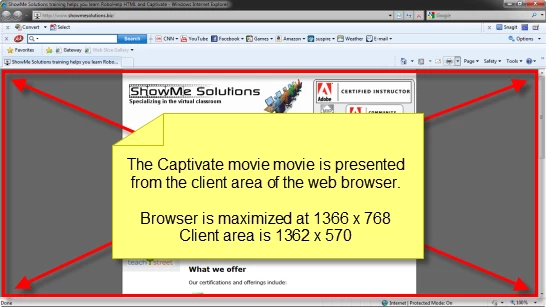
    Consider the image below:

    The area highlighted in Red is the space available (at least in this configuration) for presenting the Captivate output. As you can see, there is less space available because the browser itself consumes space. And that is what causes the scroll bars.

    Cheers... Rick

    Helpful and Handy Links

    Captivate Wish Form/Bug Reporting Form

    Adobe Certified Captivate Training

    SorcererStone Blog

    Captivate eBooks

    4 replies

    Inspiring
    July 30, 2010

    You can put a caption on slide 1 asking your learners to press F11, which (on most browsers) displays the content full screen.

    Inspiring
    July 29, 2010

    Thank you, Lilybiri and Rick, for your answers.

    Captiv8r
    Captiv8rCorrect answer
    Legend
    July 29, 2010

    Hi there

    jay fresno wrote:

    ...How can I capture the full screen and not end up with a project that requires scrolling to see the whole slide?

    The unfortunate (and unvarnished) truth is that you simply can't. Sure, you can capture at full screen. No problem with that. But you have to play the darn thing back. So where does playback occur? Usually in the browser, right?

    Consider the image below:

    The area highlighted in Red is the space available (at least in this configuration) for presenting the Captivate output. As you can see, there is less space available because the browser itself consumes space. And that is what causes the scroll bars.

    Cheers... Rick

    Helpful and Handy Links

    Captivate Wish Form/Bug Reporting Form

    Adobe Certified Captivate Training

    SorcererStone Blog

    Captivate eBooks

    Participating Frequently
    July 30, 2010

    Hi Capitv8r Near this problem i have another big one: in Captivate 4, if i start the blabla.swf on the webserver directly, the movie is every time on fullscreen. Now with Captivate 5 when i start the .swf file, after 2 seconds its going much more smaller and on the left side, not in the midle. I search everywhere, but waht i do, its the same action. Do you have a idee, or is this in capitvate fix, when you publish an swf file that is going in smaller modus on the browser (ie8)? Very thanks for help.

    Lilybiri
    Legend
    July 29, 2010

    Hi Jay,

    Can you check the Skin editor: did you include perhaps borders and/or Playback control? This will add to the total resolution of the project.

    Lilybiri