
Participating Frequently
May 30, 2013
Question

Go To Slide x on Quiz Pages?

  • May 30, 2013
  • 1 reply
  • 1774 views

Hi Cp folks,

On several quiz slides I have a button with the action "go to slide X" (see screenshot). Unfortunately this doesn't work in Cp6.
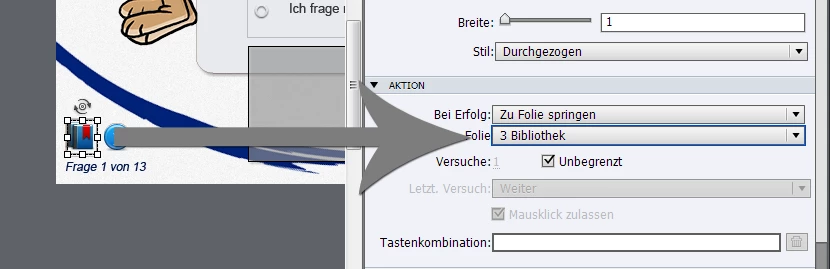
Is there any workaround to set a button to go to other slides in the same project?

Thanks in advance,

Markus

This topic has been closed for replies.

1 reply

Anjaneai_Srivastava
Adobe Employee
Adobe Employee
May 30, 2013

I think this must be working in the Preview F4 Markus?

Does it work fine on regular slides. Can you verify Quiz --Quiz Preferences -- Settings under required have you selected Pass or Answer All, that will force the user not to jump unless he has answered the question (correctly), switch it to optional.

Can you publish and check it on different Web browser and compare result?

If yes, this could be an issue with Flash Security Settings.

Read Developer tools in the artcile and apply the steps to add your project as well ;

http://help.adobe.com/en_US/FlashPlayer/LSM/WS6aa5ec234ff3f285139dc56112e3786b68c-7ff0.html

Thanks.

markus-koAuthor
Participating Frequently
May 30, 2013

Hi Anjaneai,

thanks for your reply! It works neither in the F4 Preview nor different browsers (IE, FF) but on regular slides as expected – the only problems were in the quiz slides.

Additionally my Quiz Preferences were "optional".

Any further ideas Anjaneai?

Cheers,

Markus

Anjaneai_Srivastava
Adobe Employee
Adobe Employee
May 30, 2013

Hi Markus,

A standard Question slide does not allow any interactive object uless you have a smart shape-- turned to be "use as button".

Can you try and add a shortcut key to this button and see if that works?

Thanks