
Exit
  • Global community
    • Language:
      • Deutsch
      • English
      • Español
      • Français
      • Português
  • 日本語コミュニティ
  • 한국 커뮤니티
0

Help Please- Captivate timeline

New Here ,
Apr 19, 2021 Apr 19, 2021

I'm a brand new student using Captivate for my very first project.

Somehow I accidentally compressed the timeline. Instead of 1 second by 1 second, it is showing by whole minutes. How can I change it back?
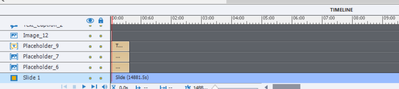
 

Timeline issue.PNG


339
Translate
Report
Community guidelines
Be kind and respectful, give credit to the original source of content, and search for duplicates before posting. Learn more
community guidelines

correct answers 1 Correct answer

LEGEND , Apr 19, 2021 Apr 19, 2021

Please read this blog:

http://blog.lilybiri.com/captivates-timeline-s-demystified-intro

You need to drag the slider at the bottom to zoom out.

Translate
LEGEND ,
Apr 19, 2021 Apr 19, 2021

Please read this blog:

http://blog.lilybiri.com/captivates-timeline-s-demystified-intro

You need to drag the slider at the bottom to zoom out.

Translate
Report
Community guidelines
Be kind and respectful, give credit to the original source of content, and search for duplicates before posting. Learn more
community guidelines
New Here ,
Apr 19, 2021 Apr 19, 2021

Thank you!

Translate
Report
Community guidelines
Be kind and respectful, give credit to the original source of content, and search for duplicates before posting. Learn more
community guidelines
New Here ,
Apr 19, 2021 Apr 19, 2021

Never mind- I figured it out. It was the zoom feature but it was locked because I had locked objects. Once you unlock the objects, you can change the zoom feature again. Beginners troubles!

Translate
Report
Community guidelines
Be kind and respectful, give credit to the original source of content, and search for duplicates before posting. Learn more
community guidelines
LEGEND ,
Apr 20, 2021 Apr 20, 2021
LATEST

Thanks for the heads up, but you didn't show any locked object in the screensho!

Translate
Report
Community guidelines
Be kind and respectful, give credit to the original source of content, and search for duplicates before posting. Learn more
community guidelines
Resources
Help resources
