Answered
Hidden object shows when previewing
I have an object in the Timeline which is hidden (X in the eye column). When I preview the slide, the hidden object is visible. Is there a way to preview without seeing hidden objects?

I have an object in the Timeline which is hidden (X in the eye column). When I preview the slide, the hidden object is visible. Is there a way to preview without seeing hidden objects?
Hi Jay
This is normal behavior. When you hide things in the Timeline, you are only hiding them from YOUR view as a Captivate author. This allows you to get them out of the way temporarily as you work on other objects.
For example, perhaps you have five captions that will all appear in the same location, but at different times. You would then want to hide all but the one you are interested in while editing.
From what you posted it would seem you are expecting the feature to also hide the object during playback. That won't happen typically. However, if you really do wish to hide it during playback and you have Captivate 4, they have added a new feature to the properties. It's found on the Options tab and is labeled "Visible".
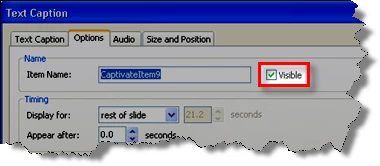
Cheers... Rick 
|
Already have an account? Login
Enter your E-mail address. We'll send you an e-mail with instructions to reset your password.

 AdChoices