
Participating Frequently
July 22, 2009
Answered

How can I get a click box to interact with a text entry box on the same page?

  • July 22, 2009
  • 1 reply
  • 640 views

I'm creating a tutorial on using a specific system and trying to recreate what the end user would actual do in the system.  On one slide, the end user must enter text into a field, then press a button (click box) to advance to the next slide.  I want to be able to have the click box validate if the text entry is correct before advancing to the next slide.  Is there a way to get the click box to validate the text entry?  Not sure how to get the two objects to "talk" to each other rather than function independently.
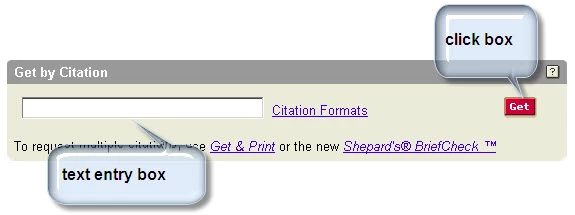
Literally, I want the end user to enter the data in the text entry box, then click on the Get button.  I need the Get button (click box) to both validate that the data entered in the text entry box is correct and, if it is, advance to the next slide.  If the data is incorrect, I need the Get button (click box) to show the failure caption and have the end user re-enter the data correctly.

How do I get the objects to work together?

This topic has been closed for replies.
Correct answer RoboWizard

Hi there

You need to delete the Click Box. Yes, you heard me. Delete the puppy.

I  know it sounds weird. But bear with me. After you delete it, double-click the Text Entry Box. Then click the Options tab. See that option called Show Button? Click it and click OK to dismiss the TEB properties.

Now you have the button you want. If you don't want a button, double-click it and set it as transparent. Remove the text. Position as desired where the Click Box was before.

Cheers... Rick

Helpful and Handy Links

1 reply

RoboWizard
RoboWizardCorrect answer
Inspiring
July 22, 2009

Hi there

You need to delete the Click Box. Yes, you heard me. Delete the puppy.

I  know it sounds weird. But bear with me. After you delete it, double-click the Text Entry Box. Then click the Options tab. See that option called Show Button? Click it and click OK to dismiss the TEB properties.

Now you have the button you want. If you don't want a button, double-click it and set it as transparent. Remove the text. Position as desired where the Click Box was before.

Cheers... Rick

Helpful and Handy Links

GoldenCJAuthor
Participating Frequently
July 22, 2009

AH! I haven't used that feature in so long, I completely forgot about it. Thank you so much!