


- Home
- Captivate
- Discussions
- Re: How do i add name entry field to populate a ce...
- Re: How do i add name entry field to populate a ce...
How do i add name entry field to populate a certificate??

Copy link to clipboard
Copied
I am trying to add name entry fields to a quiz so that it will produce a certificate with the pass mark on it!!
Can anyone advise how i do this i have added the quiz and questions to my project however i do not know how to add a certificate with names entry fields that auto populate from another slide?
Thanks in advance 


 5
Replies
5
5
Replies
5


Copy link to clipboard
Copied
Are you using a certificate interaction?
Are you using SCORM? If so the variable cpQuizInfoStudentName contains the name.
Copy link to clipboard
Copied
TLCMediaDesign i believe i am as i am using adobe captivate 8.
I am new to captivate so most thing are trial and error at the moment.
Any help is great.

Copy link to clipboard
Copied
Sorry, thought to answer, but you want David.
Copy link to clipboard
Copied
By all means jump in Lieve, I'm extremely busy at the moment!

Copy link to clipboard
Copied
First, in you project select "Project" and "Variables". Select "Add New". In the name box, type "username" and the "Save" and Close.
Recommend you have a slide to "type name" here to print certificate.
Next on the slide you want to collect the text, "Insert" and select "Text Entry Box"
Change the Text Entry Box name to "username"
Then Change your "Default Text" to something like "Please type your name here"
Select "More Options" and type in the number of characters that will fit your need (i.e. 50 is enough for a name)
Next select "Variable" drop down and select "username".
More below image

Next you need to insert a Blank Slide.
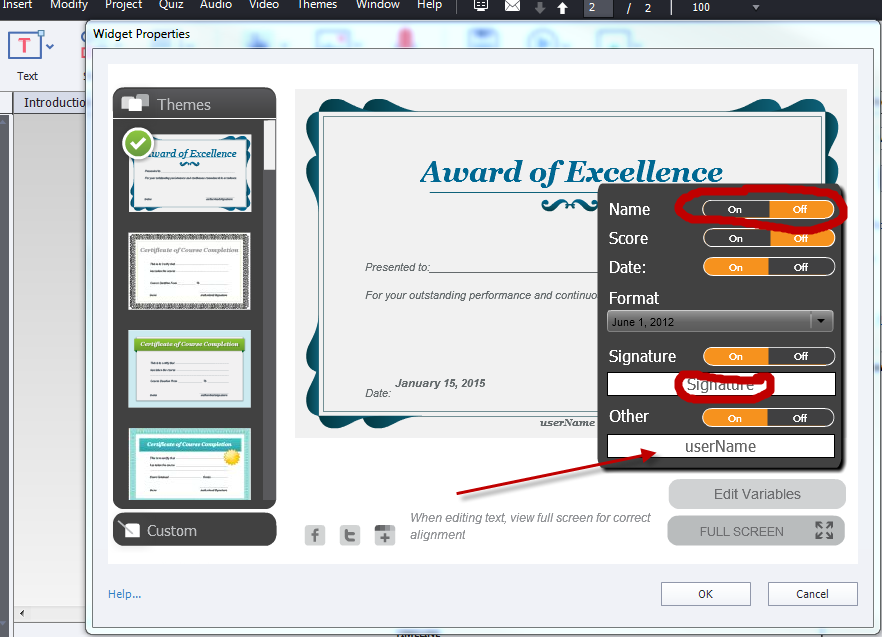
Then "Insert" and "widget". Select the certificate you want to use.
Then "Edit variables". Turn "Name" off.
Type the Signature Name and Turn Other On and type username and OK.
That is all there is to it.
If that does not generate the name on the certificate
One the Certificate slide
Go back to the "Insert" and select "widget" and "Text Area"
Another widget box will appear and you can move the box to accommodate your selected certificate.
See image below


Get ready! An upgraded Adobe Community experience is coming in January.
Learn more
 AdChoices