
How do I get smart shapes to appear as feedback for my drag and drops?
Hello,
Typically, the feedback that the user sees when he "fails" a drag and drop comes in the form of a "failure shape". The same is the case when the "on accept" and "on reject" check boxes are clicked for the drop targets -- you get "success shapes" and "failure shapes", respectively. This gives you immediate access to several shape styles in "Style Name" drop down box.
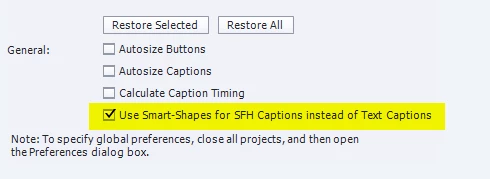
In one of my projects, the feedback for the drag and drops come in the form of "success captions" and "failure captions". This is frustrating because it gives me access to a whole new set a styles -- captions styles, and I can't use the typical failure and success smart shape styles that I like to use.
My work around has been to copy the slide into a new project, create the drag and drop there, and move the slide back into the orignal project.
Does anyone have an idea on how to fix this problem? It seems to only be a problem in this one project. The theme used is not the issue because I am using the same theme in many projects where I don't have this problem.
Thanks for any help!
 AdChoices