
Participant
March 19, 2020
Question

How I can install Spanish TTS Language in Adobe Captivate 2019?

  • March 19, 2020
  • 2 replies
  • 1699 views

Hello Everybody


I have a simply question related text to speech function in Captivate 2019

I need to work in Spanish TTS but it is not available in the official pack provided on the follow link http://download.macromedia.com/pub/captivate/cp11/win64/Captivate_2019_x64_Neo_Content_LS21.exe


I have installed also Native Windows 10 Spanish Mexico TTS in my PC, Even though Spanish is selected Captive it doesnt recognize them and record TTS in english

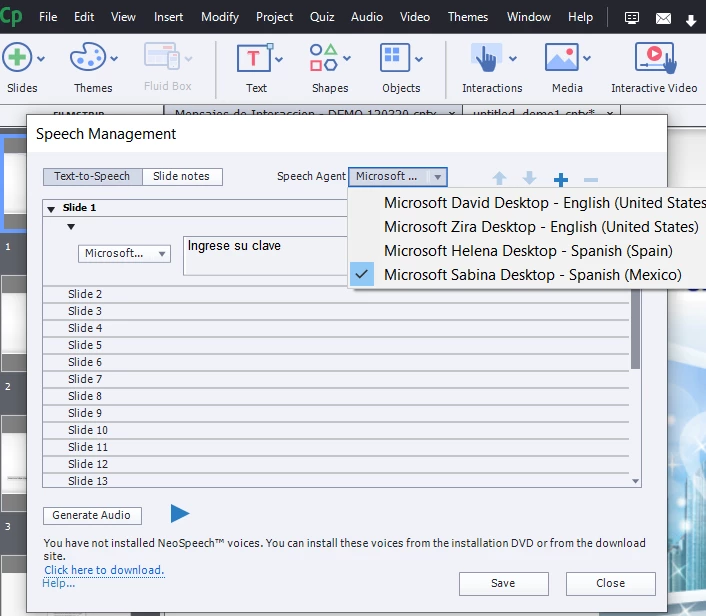
In the Speech management windows the program shows language to select them but it doesnt works (see picture)


I really appreciate your support in order to know how or where i can download Spanish TTS Pack add-on that works


Thanks

Fred


This topic has been closed for replies.

2 replies

Paul Wilson CTDP
Community Expert
Community Expert
March 19, 2020

I just tested this out by installing the Windows 10 language pack for both Spanish (Spain) and (Mexico).  I typed in "Puedes hablar más despacio, por favor" I have to say when on vacation in Mexico and it worked fine. Only difference I see is that I'm running the latest version of Captivate 2019. Click on Help and Check for Updates.

Paul Wilson, CTDP
Inspiring
March 19, 2020

Did you select the Sabina voice only on the global Speech Agent selector at the top of the screen? I think you'll have to also select it from the dropdown next to every text to speech line before you generate the adio. Sorry in case you did this. Your screenshot doesn't really tell.

Participant
March 19, 2020

Hi Gaanf


Let me explain to you step by step

1. Yes i did, i selected Sabina voice at the top agent voice selector at first time

2. Also selected them in Slide 1 button

3. After that i pressed generate audio button and a emergent window appeared with a progress bar,

4. After that click on play button

But, the voice played was not Sabina, but keapt English Voice

Lilybiri
Legend
March 19, 2020

Can you show a screenshot of the TTS dialog box? Would also like to know the exact version you are using, as you can find under Help, About Captivate.