Inspiring
May 10, 2013
Answered

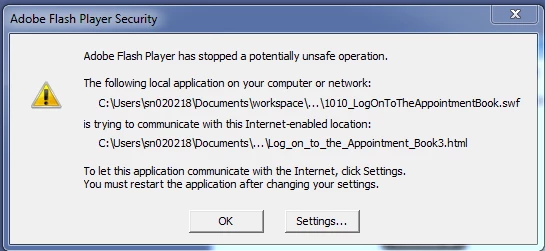
How to bypass "adobe flash player has stopped a potentially unsafe operation" in IE

  • May 10, 2013
  • 1 reply
  • 3316 views

I keep getting a pop up message as soon as i try to lauch/open any captivate simulation that has been published in SWF/HTML5 format.

Any idea how to fix this? I have tried changing the settings in IE but did not work .

    This topic has been closed for replies.
    Correct answer ElGuitarMan0

    You could try setting the location as the drive for example C:\. Use this link to change your settings.

    1 reply

    RodWard
    Community Expert
    Community Expert
    May 10, 2013

    You need to set up the publish folder location as a trusted location in your Flash Player Global Security settings.  If you don't know how to do this, Google for Flash Player Global Security.  Plenty of articles online about it.

    Inspiring
    May 10, 2013

    Hi RodWard,

    I tried it.. doesnot work . I have set up Documents > My Adobe Captivate Projects as the trusted location. This is where I publish my files.

    ElGuitarMan0
    ElGuitarMan0Correct answer
    Inspiring
    May 10, 2013

    You could try setting the location as the drive for example C:\. Use this link to change your settings.