Participant
July 28, 2014
Answered

How to change table of contents text color

  • July 28, 2014
  • 2 replies
  • 1294 views

Hi There,


Can somebody please suggest me how to change table of Content Text Color in Captivate6.


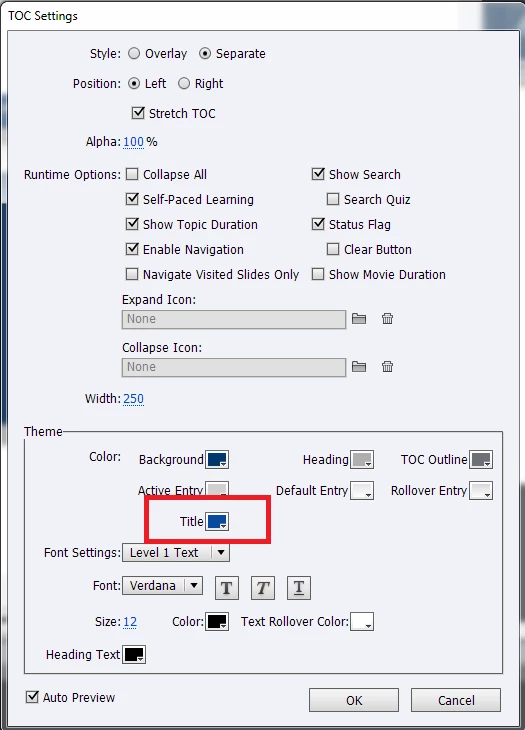
Please refer below image, highlighted text color should be changed.


Looking forward for help.


Thanks,

Srikanth


This topic has been closed for replies.
Correct answer Justenuf2bdangerous

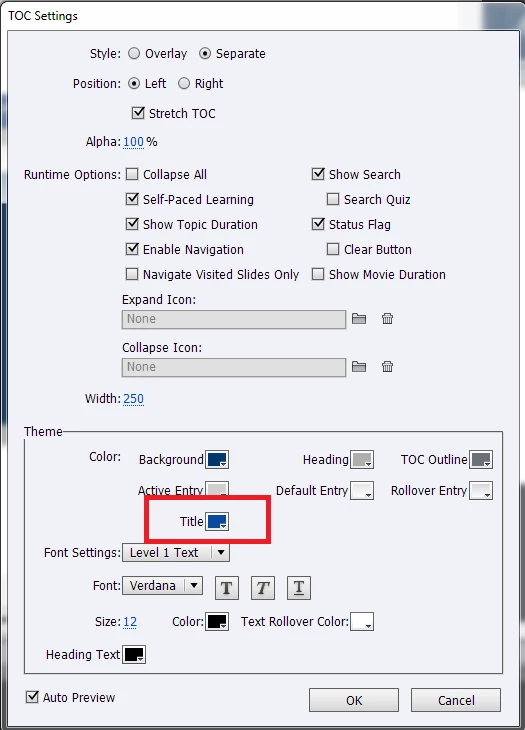
The color behind the text is controlled by "Title" selection under color.

the title text font, size and color are controlled by accessing the "Info" button and selecting "Title" from the theme area and changing your selections there.

Hope this helps - sorry for the delay - got caught in a deadline drama!

2 replies

Justenuf2bdangerous
Justenuf2bdangerousCorrect answer
Inspiring
July 29, 2014

The color behind the text is controlled by "Title" selection under color.

the title text font, size and color are controlled by accessing the "Info" button and selecting "Title" from the theme area and changing your selections there.

Hope this helps - sorry for the delay - got caught in a deadline drama!

Participant
July 31, 2014

Hello Justenuf2bdangerous,

Thanks for your reply,It's working.


Regards,

Srikath

Justenuf2bdangerous
Inspiring
July 28, 2014

Select the Skin Editor or Table of Contents from your project dropdown menu. At the bottom of the TOC list is a settings button- select to open the g following:

You can set all the variations in the TOC from entry and exit to background colors to font size, type and color here.

Justenuf

Legend
July 28, 2014

Justenuf, unless I am missing something here, we can use that only to set the formatting of list of contents and not the font color of highlighted area in the original post.

Sreekanth

Justenuf2bdangerous
Inspiring
July 28, 2014

Seekranth:

The Heading Text with the color box at the bottom controls the highlighted area's color.