
MiRoeder
Participant
May 18, 2017
Answered

How to export a Project created by Adobe Captivate 2017 for Adobe Captivate 9

  • May 18, 2017
  • 2 replies
  • 3646 views

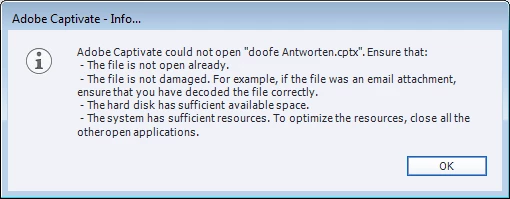
I created a quiz with Captivate 2017. I did not find a possibility in version 2017 to export for version 9. In the “Save As” dialog is one file type “Captivate File(*.cptx)” only. So it looks like the version number does not matter. As I tried to open the file created by version 2017 by Captivate 9, I got the following error message box.
This topic has been closed for replies.
Correct answer Lilybiri

I am just a user, and know this is the way Captivate behaves. You can always log a complaint to Adobe.

Not every application is able to save to older versions. Simple applications like Word never added that much features since 10 years as Captivate did, and you can have several versions of Captivate installed on the same system (which is not possible for all applications).

2 replies

Participant
August 30, 2018

I'm on the same boat and I don't think it is possible.  I tried different things, but nothing seems to work.  Has anybody found a workaround?

Lilybiri
Legend
August 30, 2018

It is not possible: you can open a project made in a previous version in a more recent version, but do not expect everything to work perfectly. The pace at which Captivate has added features is too quick. It is not possible to open a project created in a more recent version in a older version. Sometimes it is possible to copy/paste slides between them, but not between all versions. It is also possible to open the library of a more recent version in an older version as external library to get the assets and try to recreate from scratch.

Lilybiri
Legend
May 18, 2017

This has never been possible with Captivate: a project created with a later version cannot be opened in a previous version. Sorry to be the messager.

MiRoeder
MiRoederAuthor
Participant
May 19, 2017

Hello Lilybiri,

thank you for your quick answer.

But I disagree! Every usual (commercial) program I know is able to interwork with older versions. In Microsoft Word, Excel or in Adobe FrameMaker you can explicitly save for an older version.

In Captivate you don't see the program version. You get an incorrect error message box. The message box tells you different reasons, why opening failed. But the actual reason is not mentioned.

kellenm35646335
Participant
August 24, 2017

Between some versions copy/paste slides worked. I suspect the changes under the hood were too big this time.


Arggh...thanks.

giphy.gifgiphy.gif