


- Home
- Captivate
- Discussions
- Re: How to make an animation play on the click of ...
- Re: How to make an animation play on the click of ...
How to make an animation play on the click of a button

Copy link to clipboard
Copied
Hi,
I am trying to find an advanced action that allows me to PLAY an animation (swf) on the click of a button. Currently I am showing a swf but this does not allow the animation to play out.
Thanks in advance,
Liam


 6
Replies
6
6
Replies
6


Copy link to clipboard
Copied
Hi There,
Welcome To Adobe Forum.
Can you please let us know which version of Adobe Captivate you are using?
Also in Adobe Captivate 7 when choosing button properties click on the "Apply Effect" option that will open the animation tempelate.
Thanks
Loveesh
Copy link to clipboard
Copied
Hi,
Thanks for your reply.
I am using Captivate 6.
With the "Apply Effect" option that you talk about in Captivate 7, does this allow SWF animations to be played on the click of a button?
Thanks,
Liam
Copy link to clipboard
Copied
Hi Liam,
Thank you for you reply.
However if you are using CP 6 then you can use the option insert>>Animation option and add the SWF animation that you have.
Then Click on on the button properties and choose "Advance Action" option and then under the standard actions window use the "Show" option and choose the animation that you have inserted as shown in the image below:
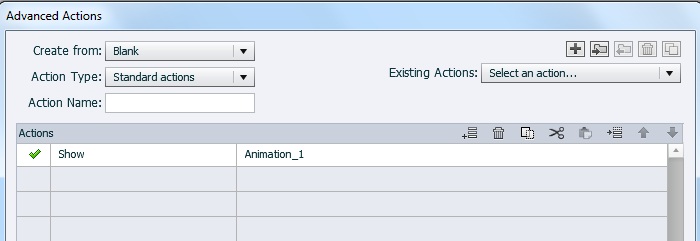
In case of CP 7 we can execute the available standard animation using the "Apply effect" option but the apply effect had to executed on "On Slide Enter" or "On Slide Exit" option.
Thanks
Loveesh
Copy link to clipboard
Copied
Hi,
Thanks for your reply.
This is how I currently get animations to appear, however this function only shows the animation and does not actually play it.
Is there a way for the animation to start playing on the click of the button?
Thanks
Liam

Copy link to clipboard
Copied
@Loveesh I am totally puzzled for the moment, could you please explain why Apply Effect should be used to play a SWF animation. You can show and hide a SWF (but you should have labeled the advanced action). And why Apply Effect can only be triggered by the slide events. Always ready to learn something new, please.
Lilybiri
Copy link to clipboard
Copied
Hi Lilybiri,
Thank you for the information.
However what I mean to say is that if you insert a standard button and try to excute "Apply effect" option on button th option will be greyed out.
Also you can apply the "Apply effect" option on Slide either "On Slide Enter" or "On Slide Exit" option. As what i understand from "Apply effect" option is to create an event based animation triggers using the following steps:
- Select the object that is the base for the event. For example, to apply an effect to an object after a specific slide begins, select the slide.
- In the Actions panel, select Apply Effect in the On Enter or On Success drop-down lists.
- In the Object Name drop-down list, select the object to which you want to apply an effect.
Thank you again for providing us the useful information.
Thanks and Regards
Loveesh


Get ready! An upgraded Adobe Community experience is coming in January.
Learn more
 AdChoices