
muchelleb
Inspiring
June 24, 2018
Question

Hyperlink not working (text caption)

  • June 24, 2018
  • 3 replies
  • 1531 views

Hi There,

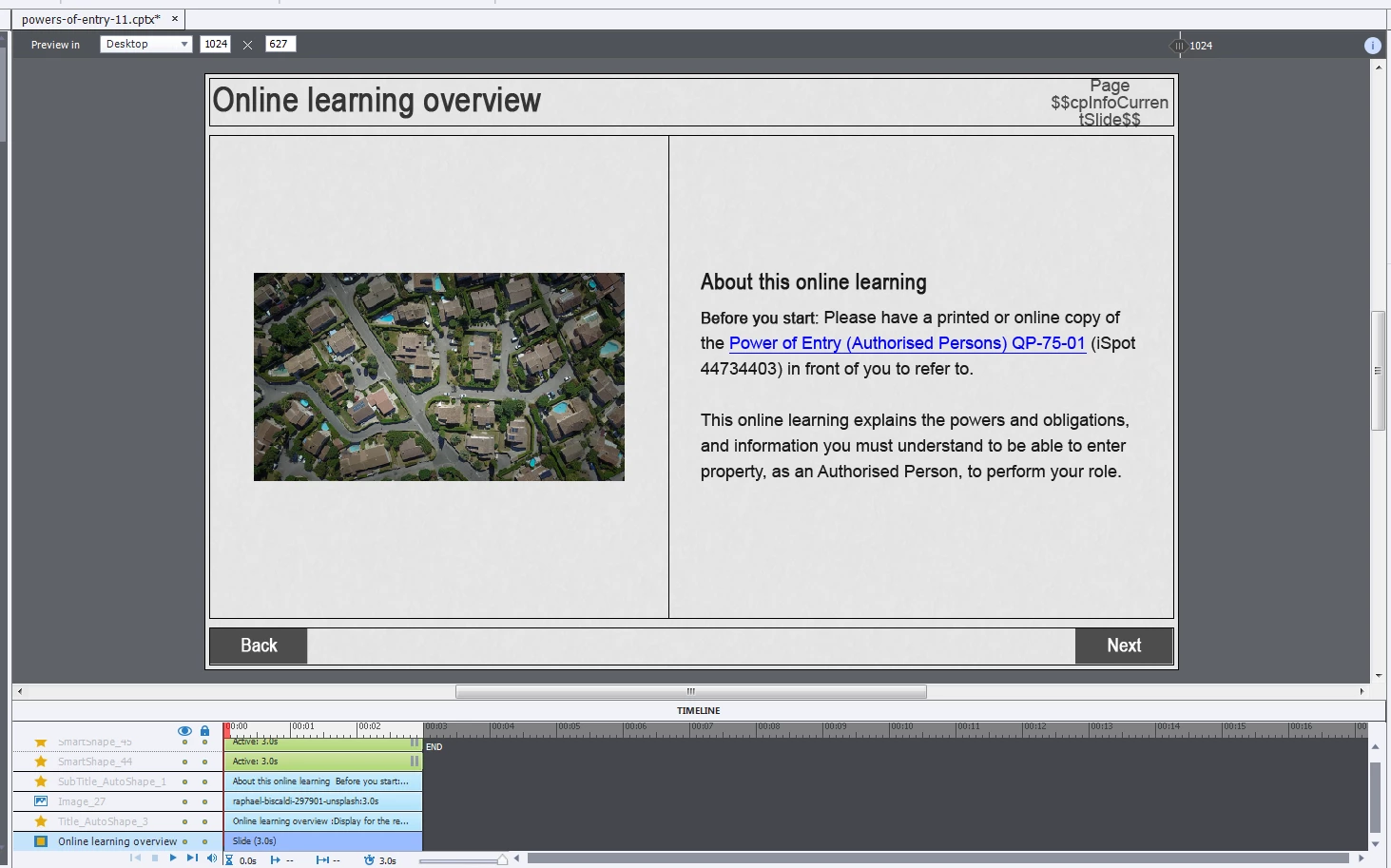
I've inserted a hyperlink against a text caption (see below image) and it's unresponsive on click. Even when you hover over the hyperlinked text, the cursor doesn't change - it acts like there's no link. I have tested in preview and uploaded to LMS.

However, when you move your mouse down the page a little (to the text 'and information you must understand'), the cursor changes AND I'm able to click and open the link. It's as if the link positioning has been moved down the page.

I know that I could add a shape - but as the project is responsive, the shape just gets pushed all over the page as you change the screen size.

If anyone has any ideas on how to fix, that'd be great.

I use Adobe Captivate 2017.
This topic has been closed for replies.

3 replies

muchelleb
muchellebAuthor
Inspiring
June 26, 2018

It's a text caption. I double click in the text caption and type.

I have tried fully recreating the page and the issue still occurs. It occurs when I create the page in another file entirely as well.

I'm hoping that the below link to a SCORM cloud file of just the one page with the issue works. Please let me know if not.

https://cloud.scorm.com/sc/InvitationConfirmEmail?publicInvitationId=915e9098-5798-47ec-8349-4db2d276b71b

Thanks so much for your help.

Participating Frequently
June 26, 2018

Can you send me the project file? I want to play around with it a little bit. I definitely see the problem in your example

- cooperjkyle@gmail.com

muchelleb
muchellebAuthor
Inspiring
June 27, 2018

Hi Kyle,

I have sent you the project file Thanks again for your help.

Michelle

Participating Frequently
June 25, 2018

If you copy and paste the content to a new slide, does it still have the issue? If so, can you create a single-slide project and share it?

Lilybiri
Legend
June 25, 2018

It is a responsive project, developed with  Fluid Boxes, correct?

How did you set up the FB with that text?

muchelleb
muchellebAuthor
Inspiring
June 25, 2018

It is a responsive project developed with fluid boxes.

I just double clicked in the fluid box and added text.

Is this helpful?

Lilybiri
Legend
June 26, 2018

Hmm…. that sentence is puzzling 'I just double-clicked in a Fluid Box and added text'. That is not possible: you can add a text container to a Fluid box: that container can be a shape or a caption, but a Fluid Box itself is not a text container.