Participant
June 22, 2015
Question

I am trying to link a pdf to a button. the pdf presents in preview but not once it is published. Any thoughts, advice?

  • June 22, 2015
  • 2 replies
  • 236 views

    This topic has been closed for replies.

    2 replies

    RodWard
    Community Expert
    Community Expert
    June 23, 2015

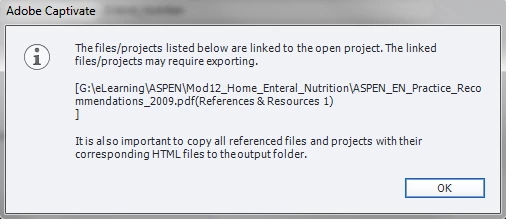
    This dialog is just a standard warning that is telling you the PDF file you are linking to needs to be manually placed in the publish folder so that it will get uploaded with the rest of the content.  The best way to do this is to just publish once to the folder on your PC hard drive that you would normally use then copy the linked PDF into that folder in the same location as the main SWF file.  If you're doing this, then all you need to specify inside Captivate as the relative link to the PDF is the filename of that PDF.

    BDuckWorks
    Inspiring
    June 22, 2015

    The letter G in your file path indicates that the PDF has been attached via your computer's mapped drives.

    You'll need to:

    a) Use a relative URL and include the file in the folder with the exported project

    or

    b) Use an absolute url, with HTTP://, that points to a server that the learner will be able to access. This can be complicated by an Intranet / Extranet setup, where the user may be limited to the servers they can access.

    Captiv8r
    Legend
    June 22, 2015

    If you want to test it locally, you will need to add the G location file path to the list of trusted locations for the Flash Player.

    The link below will show you how to do that.

    Click here to view

    Cheers... Rick