
September 23, 2015
Question

I can not preview/publish the course. Presenter said that "Could not load XML file". Any ideas?

  • September 23, 2015
  • 7 replies
  • 4086 views

Hi.

First of all, I can not use English very well, so you could have hard to understand what I talking about.

I am using Presenter 10 now. Today I added short MP4 video on the slide and clicked the Preview, but it did not work.

And I could only see the below pop-up box.
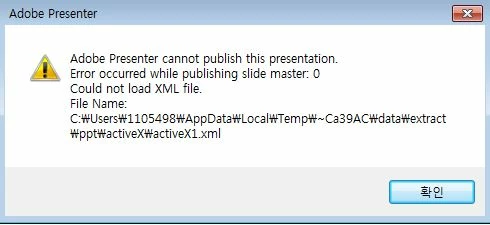
So I deleted the video. After that preview worked.

I also tried with another computer, and preview and publishing was working at that time. That means that my computer or my presenter is the problem.

In this case, how can I find the problem and how can I fix it? (I know nothing about XML tings.)

Any ideas?

Thank you.

Oh, I am using;

Windows 7 64bit

MS office 2013

Presenter 10.

This topic has been closed for replies.

7 replies

Adobe Employee
October 13, 2015

Hi All,

The issue of publishing the project is fixed now.

To fix the issue, just update the Flash ActiveX to the version 19.0.0.207 and you will be able to publish again.

To update the Flash ActiveX go to this link from Internet Explorer : Adobe Flash Player Install for all versions

To recover the old projects which got corrupted you can go through this article and recover all your old projects : https://helpx.adobe.com/presenter/kb/projects-in-presenter-get-corrupted.html

Thanks,

Soumo

Inspiring
October 13, 2015

Thank you very much I waited for it, because cant publish some my courses that contains swfs from captivate.

Inspiring
October 13, 2015

Was having the same error along with occasionally an error that the file needed "repair".  Was using Presenter 9 with PowerPoint 2013 64-bit.  Then saw where Presenter 9 is not compatible with 64-bit so I uninstalled PowerPoint 64-bit and installed the 32-bit. Same problem. Read the earlier post about Flash Player beta. Installed it and still not working right.  I am working in Windows 10.

Upgrade you say?

Tried that and still had problems. PLUS, I am teaching a Presenter 9 class.

Adobe Employee
October 13, 2015

Hil,

The issue of publishing the project is fixed now.

To fix the issue, just update the Flash ActiveX to the version 19.0.0.207 and you will be able to publish again.

To update the Flash ActiveX go to this link from Internet Explorer : Adobe Flash Player Install for all versions

To recover the old projects which got corrupted you can go through this article and recover all your old projects : https://helpx.adobe.com/presenter/kb/projects-in-presenter-get-corrupted.html

Thanks,

Soumo

Participant
October 9, 2015

I downloaded the Beta version of Flash (19,0,0,209) and it seems to have fixed the problem. Of course the Beta version seems buggy, as it crashes my browser, but at least I can publish my files. You can download the Beta version here: Download Adobe Flash Player 19 Beta for Desktops - Adobe Labs

andrewb20718446
Participant
October 9, 2015

I am experiencing the same issue.  However, I do not know if Adobe has fixed the problem yet.

Jorma_at_CoSo
Legend
October 9, 2015

Add your voice to the bug report linked in a earlier post. The more poeple  that report the issue the more priority it will recieve from Adobe. I hope that it will be resolved in the next update to Flash...

Participant
October 12, 2015

I'm having the same issue and it's a huge problem as we need to get this course published ASAP.

Participant
September 24, 2015

Guys from iSpring Solutions have managed to develop a tool that fixes presentations with broken Flash objects

http://www.ispringsolutions.com/blog/how-to-restore-a-powerpoint-file-corrupted-by-flash/

God bless iSpring

Participating Frequently
September 24, 2015

Hi,

This issue is known to us.

We are investigating the problem.We will provide the fix shortly.

Thanks

Participant
September 25, 2015

How soon is shortly? I have clients that want to know how long my project deliverables will be delayed.

Participant
September 24, 2015

This issue is caused by the latest Flash Player 19.0.0.185 update.

There is already an issue in Flash player issue tracker.

Bug#4062206 - Flash content cannot be embedded within Microsoft PowerPoint

I recommend you to vote for that issue to make Adobe Flash player team fix it ASAP.