
Known Participant
November 5, 2013
Question

Images in Captivate 7 Tab Interaction Plus Layout Bug

  • November 5, 2013
  • 2 replies
  • 874 views

Does anyone know how to control the size of the images in the Tab interaction in Captivate 7?

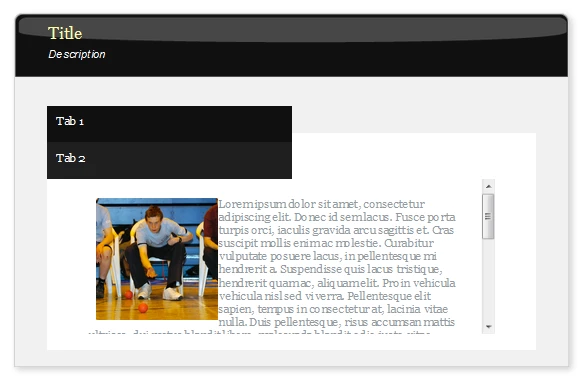
It's possible to add images to tabs but the images adeed are automatically scaled down and are generally too small to be useful (see screen grab). Sometimes it would be helpful to be able to add images without text to the tabs, when displaying graphs etc. The text run around isn't very tidy either, is this controllable?

Also, if I add only two tabs via the interaction dialogue the tabs stack vertically instead of horizontally (see screen grab). Does anyone have a fix for this?
This topic has been closed for replies.

2 replies

Lilybiri
Legend
November 5, 2013

The images in the interactions have a fixed size, which is always mentioned in the tooltip (was not correct for Timeline, but that is fixed in the last update): they are either 150x150px or 100x150px. You have to be careful that the chosen image has at least the same width/height ratio to avoid distortion. Not aware of the other bug.

Lilybiri

Legend
November 5, 2013

You cannot change the size of the image. But I am not able to reproduce the error. Which OS are you on and when do you see this error?

Sreekanth

dt4ptAuthor
Known Participant
November 5, 2013

HTML5 publish viewed on Windows Vista in the following browsers:

  • IE9
  • Safari
  • Chrome

Also prevalent on iPad iOS 7

I see the layout bug everytime I view the page with the tabs displayed.

Legend
November 5, 2013

I see that issue in the HTML5 outputs now. Guess you just discovered yet another bug with these interactivities. Please log a ticket. I will do the same

Sreekanth