


Images showing as red boxes

Copy link to clipboard
Copied
Hi all
can you help? I am working in .cp4; I have imported a number of images (.bmp, .jpg) into my project, but when the user plays the movie some (4 out of 15 images) appear as red boxes (3x.jpg and 1x.bmp)???
I previously built the package in .cp3 which played perfectly, but now I've updated to .cp4 and carried out a couple of minor amendments its all gone terribly terribly wrong,  .
.
Has anyone come across this before?
Spiersy


 38
Replies
38
38
Replies
38


Copy link to clipboard
Copied
Hi there
Do the images display as red boxes in the interface while editing, after you publish or both?
Can you please insert an image showing us what you are seeing? Please use the camera icon to insert the image inline and avoid using the Attach function.
Cheers... Rick 
| Helpful and Handy Links Captivate Wish Form/Bug Reporting Form |

Copy link to clipboard
Copied
Hi Rick
the images appear fine during edit, and run fine on my machine and a test laptop after publish. However the client, who will run it from disk on a laptop sees the images as red boxes once published.
1 of the images as follows, this appears as a simple red box

Thanks in advance
Spiersy
Copy link to clipboard
Copied
Hi there
Have you performed a double check to see what version of the Flash Player your client is using? Perhaps it needs to be upgraded.
Checking the version is simple. While the Captivate movie is running, just have them right-click it and the version should become visible in the popup.
Cheers... Rick
| Helpful and Handy Links Captivate Wish Form/Bug Reporting Form |

Copy link to clipboard
Copied
Mine display while editing. My images are Jpegs that I saved from photoshop. But some of them turn black or red, but mostly red. And whenever I save and come back, it's a different group. Any ideas?

Copy link to clipboard
Copied
Lack of resources is mostly the culprit in that case. Do you clear cache regularly?
Copy link to clipboard
Copied
Don't think so. I'll try it
Copy link to clipboard
Copied
Apparently Clear Public Cache isn't it. I tried that, but I'm still having the same issue. Any other ideas?
Copy link to clipboard
Copied
I was referring to the Captivate cache. You find a button Clear Cache in the Preferences.
Copy link to clipboard
Copied
I might've missed it, but I don't think I saw that button.
Copy link to clipboard
Copied
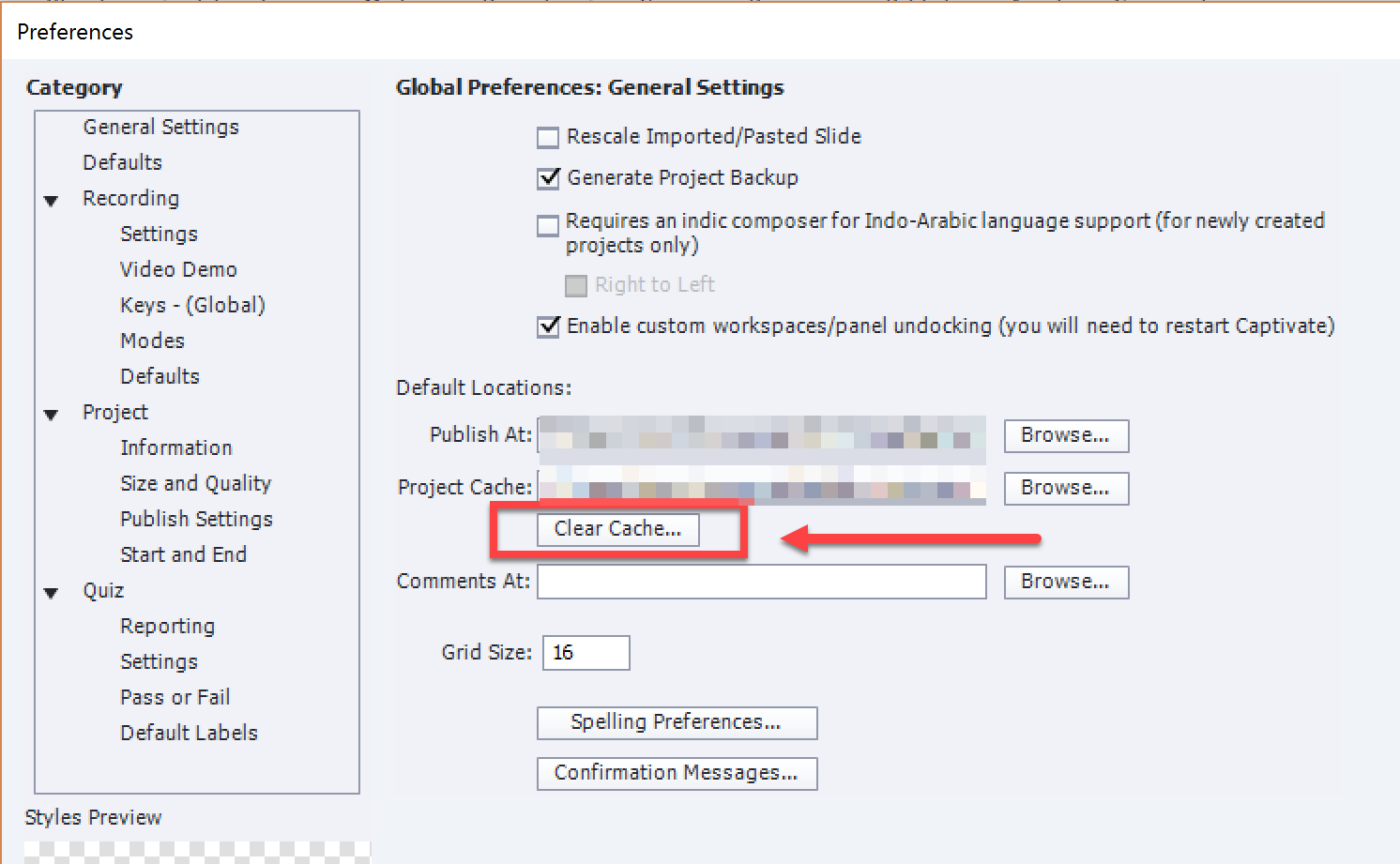
Copy link to clipboard
Copied
I don't have that windoW. Im using CS6. So what do I do now?
Copy link to clipboard
Copied
Do you mean Captivate 6 (was never in a Creative Suite)? Sorry, I don't have that version anymore and cannot remember if it had a Clear cache button. There was an AIR app that allowed you to selectively choose which cache to clear, but don't know if it is still available.
You can clear the cache manually. Look which path is used to store the cache, clear all the folders there with the strange long names like
CPD0d9627......
Copy link to clipboard
Copied
Thanks Rick
I think(?) they're using Flash 7; is there any likelyhood that .cp4 has trouble with this older version?
It just seems strange that most of the images display with no problems, but I'm having trouble with just this handful
Spiersy
Copy link to clipboard
Copied
Hi again
I believe that internally Captivate stores images in PNG format. One possibility would be to export the offending images from Captivate as PNG, then bring them back in and see if the issue resolves by replacing the BMP with the PNG equivalent.
Cheers... Rick
| Helpful and Handy Links RoboHelp Wish Form/Bug Reporting Form Begin learning RoboHelp HTML 7 or 8 within the day - $24.95! |

Copy link to clipboard
Copied
Hello there.
A little search in the Captivate forum gave me no further information.
I have the same problem there, using CP4 and exporting my project in Flash 7...
Images are 8bits PNGs...
Anyone solved that ?

Copy link to clipboard
Copied
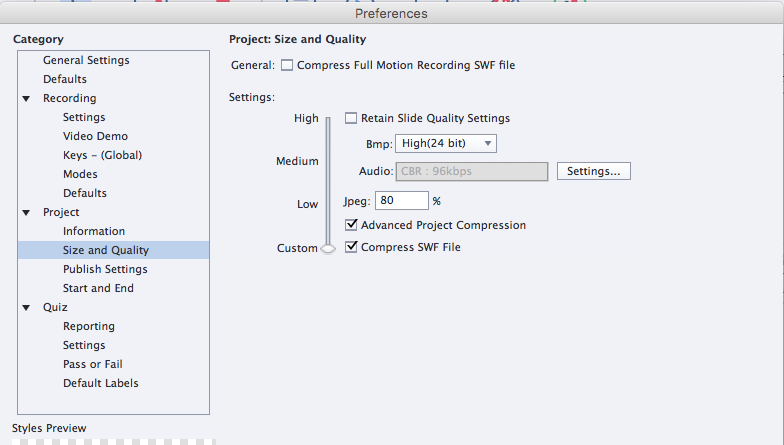
You might want to double-check that the Quality is set to Optimized or High (24-bit) in your Slide properties.
Complex images that look fine in Preview usually won't display correctly when published unless the Slide Quality is increased.
Cheers,
John

Copy link to clipboard
Copied
OMG, Jbradley88....
You solved it for me at least! ... It was weird bc I used a jpeg in one Cp 9 project and it previewed correctly and published correctly. Then I used the same image in another project (for a background of a slide)... and it previewed as a giant red block as described above... I was going bat-crap-crazy trying to figure that one out...
When I read your reply... it clicked that in my first project I did set my preferences to the higher 24 bit quality. After I changed that in the new project... the jpeg file previewed correctly. THANK YOU!!!!
If it helps... set your size/quality preferences like this and it should clear the red block of death!
C

Copy link to clipboard
Copied
Another thing to check is the actual image dimensions.
We had and issue with a red box, too.
The culprit was a large image file. 4600 x 4500 pixel image or so and 7.5MB file.
We edited the image down to a more usable 800 x 800 pixels and the redness went away.
It dod not have the same issue on my iMac with 8GB as did the 2MB PC. I scale the image to 10000 pixels x 9000 or so making it an 18MB jpeg file and when I did a test publish on my iMac, the red box showed up. But this time, it froze Captivate 5 when I tried to close the test window.
Copy link to clipboard
Copied
We were experiencing the same problem.
The images in the Flash SWF we were importing into Captivate had strokes around them, which were on a layer above the Bitmap image in the Flash MovieClip symbol.
Removing the strokes solved the "Red Box" problem.

Copy link to clipboard
Copied
I have been seeing the same problem even when using flat 24-bit png images. I had to delete the images then add them again to fix the problem. This seems to be a bug.

Copy link to clipboard
Copied
Hello there,
Are you seeing this issue in Captivate 4 or 5? Can you send me the 24bit-PNG you are refering to viswanat@adobe.com? Would like to have a look at it.
Thanks,
Vish
Copy link to clipboard
Copied
Issue: So I just had this very issue (Red box in place of inserted image on publish for Flash 10 or higher) with Captivate 7. Also had latest version of Flash on my end and client end.
Fix: Deleted it from library, and reinserted using "Insert Image"
Hope this helps for curent user issues!

Copy link to clipboard
Copied
I'm using Captivate 8 and I am having this exact issue - the image I am using was made in Illustrator, imported into Photoshop as a PDF, then saved out as a PNG. It's a large file, but I have used other large files and have not had any issues with them turning red. Has anyone found a viable solution to this? This isn't a Flash issue, at least it isn't supposed to be with C8.
Copy link to clipboard
Copied
The answer for me: make the image smaller. Captivate apparently cannot handle large PNG files. I decreased it by 50%, then when I placed it on my slide I decreased it another 40%. Works like a charm.

-
- 1
- 2

Get ready! An upgraded Adobe Community experience is coming in January.
Learn more
 AdChoices