
Inspiring
March 12, 2013
Question

Internal Error Presenter 8

  • March 12, 2013
  • 2 replies
  • 3963 views

I'm beginning to see this error on a number of projects we're saving to a shared drive. Earlier projects don't have this error, and we don't know what is causing it.

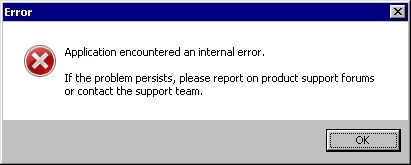
We're using Presenter 8. When we click Browse and navigate to the folder on the shared drive to open it, the project appears to load, then aborts with this error. It's happening on a number of projects.


Thanks much
This topic has been closed for replies.

2 replies

Participating Frequently
March 13, 2013

Hi,

Did the person who was recording the video got any issues in VC anywhere in the process? In this case please make sure she follows the checklist.[video card driver update etc]

Is this happening with all her recordings? In that case please send us the diagnostic report [vikrakum@adobe.com] from your system and two copies of the same sample project, one from her in which she is not facing any issue and other one in which you are facing the issue. Sample project is just needed to investigate the issue, a small project of 1 minute without any real content will do. 

If both of you are independently able to work on VC without any issue, then it's evident that some project information is getting lost in the shared location.

Is it possible for her to directly share the projects at a shared location residing in your system where you have VC installed? If it's possible, please verify whether the issue is reproducible.

Thanks,

Vikram

Inspiring
March 13, 2013

By "VC" do you mean "VPN?"

Inspiring
March 13, 2013

VC means Presenter Video Creator.


Are you making a distinction between launching free-standing Presenter versus  using Presenter in PowerPoint? Is that what you mean by "Video Creator?" 

If so, I should point out that I can't record videos in PowerPoint AT ALL. I can only do software simulations. When I atttempt to record videos, I get the following message, so I never bother to use it.

Jorma_at_CoSo
Legend
March 12, 2013

Presenter has never played well with files stored on shared drives. Try moving the presentation to your local drive when you are working on it.

Inspiring
March 12, 2013

That would work except the person creating the presentations is a remote employee. She saves them to a shared drive so I can edit them, convert them to SWF files in Captivate, and publish them in Robohelp. What do you suggest for us?

Jorma_at_CoSo
Legend
March 12, 2013

You are taking Presenter files and then using Captivate? That seems like a lot of extra work. Is there a reason you don't just work in Captivate?

Either way, transfer the PPT(X) file and the folder with the same name from the shared drive to your computer (Desktop is easiest). Then launch the PPT(X) file and see if it doesn't throw the error. The Shared drive can be used as an intermediary storage location.