
Known Participant
February 5, 2017
Question

Learners to print my customised certificate

  • February 5, 2017
  • 2 replies
  • 712 views

Hi Guys

Does anyone know how to add a print button to a slide so that the learner can print it to pdf or print a hard copy?

I created a course completion certificate and now it needs a print button.
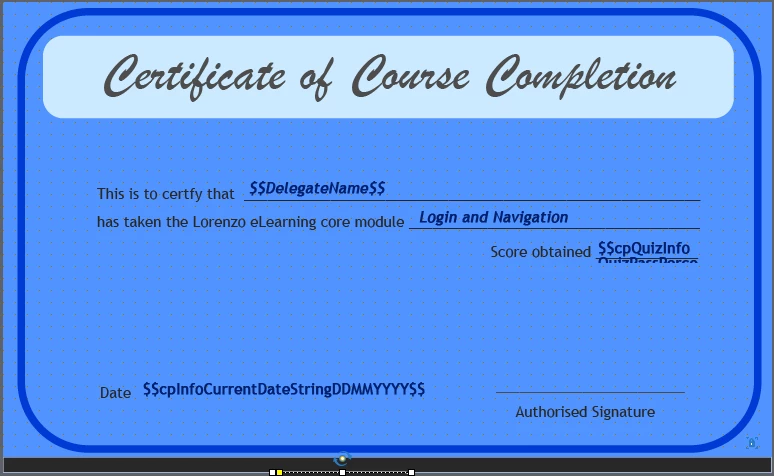
I have done some research but not found anything that does not require Java scripting from scratch.

Any suggestions would be greatly appreciated.

Thanks in advance

This topic has been closed for replies.

2 replies

gtechgaryAuthor
Known Participant
August 16, 2017

Irwin

tell me what responses you get and I may be able to help you more. Send me screenshots if you can.

gtechgaryAuthor
Known Participant
February 14, 2017

I have resolved this problem now. Sooo easy.

irwin_a
Participant
July 6, 2017

I have the same issue. How did you solve it?

I'm Running Captivate 9 and publishing to .exe. I customized my own Certificate, but cant print. I tried running a js (window.print()) but is not working (I don't know js). I don't want to use the cert widget because I want my company's certificate.

gtechgaryAuthor
Known Participant
July 6, 2017

Hi Irwn

Sorry for the delayed response.

Yeah I use the java script and it works perfectly each time.

I would have to take a look at how you set it up to see if there is any steps you've missed.

When you test it you have to test it in the actual browser and not in the preview window of captivate. In other words publish it and then try it. It should work if setup right.

Please let me know if you got it to work when published. If it does not work I can take a look at your file.

Regards

Gary