elearningbuilder11
Inspiring
December 8, 2017
Answered

Little Red 'FX' box?

  • December 8, 2017
  • 1 reply
  • 677 views

Hello,

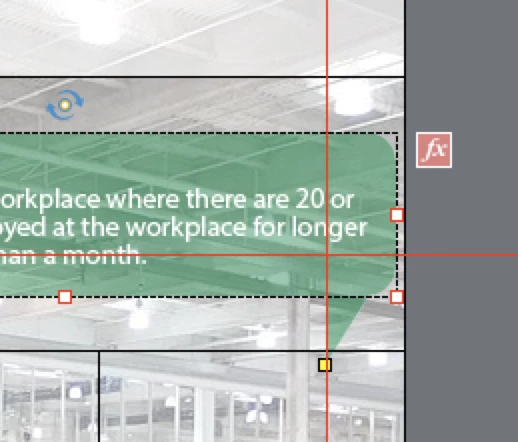
  1. What is this red 'FX' box?
  2. How do I edit what it does?

Thanks in advance, Adobe gods and goddesses (Lieve) 

This topic has been closed for replies.
Correct answer Lilybiri

That is just an indicator to tell you tha this object has an Effect applied to it. The symbol fx is universal in all Adobe apps for effects.

It doesn't do anything. You'll see it also as indicator on the object timeline. You apply an effect either with the right-click menu or directly from the Timing Properties panel. Some users insult me telling that I am mostly just making noise....

1 reply

Lilybiri
LilybiriCorrect answer
Legend
December 8, 2017

That is just an indicator to tell you tha this object has an Effect applied to it. The symbol fx is universal in all Adobe apps for effects.

It doesn't do anything. You'll see it also as indicator on the object timeline. You apply an effect either with the right-click menu or directly from the Timing Properties panel. Some users insult me telling that I am mostly just making noise....

elearningbuilder11
Inspiring
December 8, 2017

AHSO !

Now I see it in Timing--> Effects of the object, ok got it.

They had FadedZoomin on a text bubble and it 'popped' up when it played.

Thank you Adobe Captivate goddess  .

RodWard
Community Expert
Community Expert
December 8, 2017

Quick, someone mark the date!  Lilybiri just ascended from Advanced Action Queen to Adobe Captivate Goddess.  Nirvana via e-learning!