
mp4 playback freezes
I have a Captivate 8 project that combines software simulation slides and video demo slides. All of the slides were captured using Captivate.
When I publish to .swf or HTML5, playback is fine. But when I publish to .mp4, playback freezes during some of the video slides. In the movie player window, the playhead continues to move, but the image remains stuck on one slide for up to two minutes. Then, the player skips several slides and jumps ahead to a later time in the video. The freeze/skip issue doesn't always happen on the same slides, and some of the video slides play properly.
Other Notes:
- I am playing the files on my local hard drive.
- All of the video slides contain audio.
- All of the video demo files have been trimmed in Captivate.
I tried the following, but the published MP4s had the same issue:
- Removing unused items from the Library
- Clearing the cache
- Pasting all of the slides into a blank project and re-publishing
- Publishing from a different project that also contains video slides
Then I created a test project, deleted all of the video slides, and published to .mp4. The file played normally without freezing or skips. This indicates that the issue is caused by the video slides.
Here are my specs and settings:
Mac OS X 10.7.5
Captivate Project file size: 26 MB
Preferences>Recording>Video Demo>Video Color Mode: 32-bit
Project Resolution: 1280x720
Number of slides: 59
Length: 8.5 minutes
Preset: YouTube Widescreen HD (no customization)
Force re-publish on all slides: selected
Preferences>Project>Size and Quality: High
Preferences>Project>Start and End: (all options are deselected)
Preferences>Project>Publish Settings: (below)
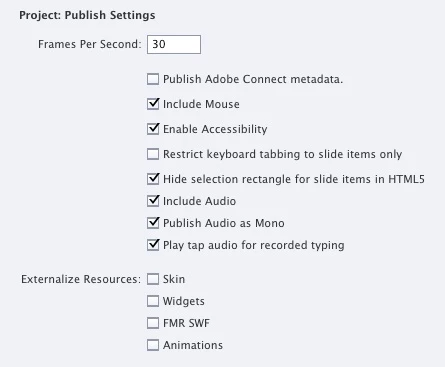
Thank you for reading my post. Any help would be greatly appreciated.
 AdChoices