
joannac1007
Participating Frequently
March 28, 2017
Answered

Navigation and captions working together

  • March 28, 2017
  • 2 replies
  • 523 views

I am in the process of trying to create a complicated "Choose your adventure" type course with multiple scenarios. I have created a project using a synchronized video and inserted slides between these videos. Each slide will have two different options, and whatever option they pick will lead them to a different section of the "adventure." I have the navigation part down but sometimes, when a scenario is chosen, before the navigation takes place I want a caption to pop up. I have not been able to master a caption popping up for a specific amount of time and then still navigating to the correct portion of the video I want to send them to.

I tried playing around with the timing of the "failure caption" on the button I created but once I changed the timing, the navigation did not occur. If I did not change the timing of the caption, the navigation would happen but the "failure caption" would not display. Any thoughts on a workaround for this?
This topic has been closed for replies.
Correct answer Lilybiri

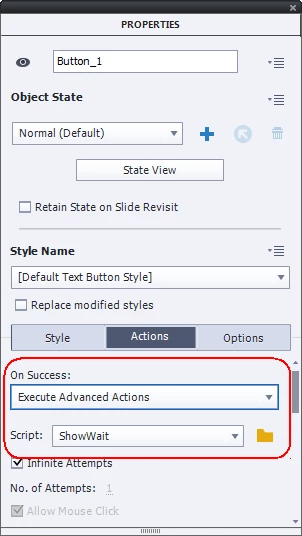
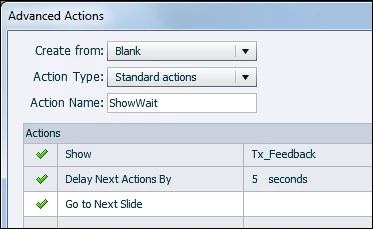
No, you need to create an advanced (or shared action) using Project, Advanced Actions. The Properties panel only offers 'simple' actions, single commands. You need to combine three commands in a standard advanced action:

This example was with Go to Next Slide, but you can also use Jump to Slide. This is an advanced, not a shared action. If you need this action multiple times I would choose a shared action. Have a look at:

Dare to Share - part 1 - Captivate blog

2 replies

Participant
March 29, 2017

Could try a button with text. Have the button pause - and when the user is ready to move on, they can press that button and it continues/jumps to the required slide.... Lilybiri's recommendation is another (maybe even easier!) option. Just need to judge how long you would want the reader to read the text - before moving on. 

joannac1007
Participating Frequently
March 29, 2017

I did actually try this but the team would rather the learner not have to click a second time for navigation to occur. Thank you for your helpful response though!

Lilybiri
Legend
March 28, 2017

What about:

  Show Text

  Delay Next Actions by ....x secs

  Jump to Slide..

joannac1007
Participating Frequently
March 29, 2017

Is this functionality available within the properties section? Working with Captivate 9. Your solution seems exactly what I am looking for.

Participant
March 29, 2017

You need to create an advanced action (A standard one).