
Inspiring
January 23, 2020
Answered

Need Animate Clear Background in Captivate

  • January 23, 2020
  • 2 replies
  • 464 views

I make the stage background clear in Animate, publish as an OAM package to place into Captivate and when I test, the background is white instead.


I posted in the Animate community first and someone suggested that I post here instead: Need Animate Clear Background in Captivate 
This topic has been closed for replies.
Correct answer RodWard

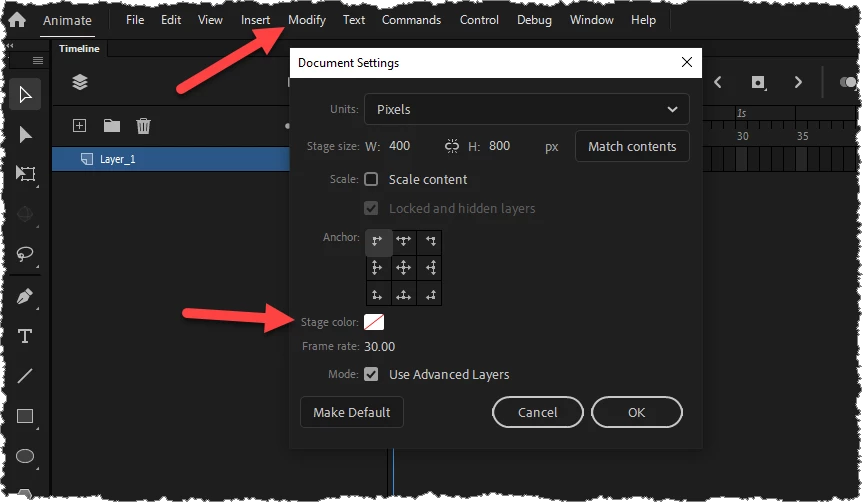
You need to configure the colour of the OAM background from within Animate before you publish the OAM.  You can do this via the Modify > Document settings dialog.  You need to set the background to transparent.

2 replies

RodWard
Community Expert
RodWardCommunity ExpertCorrect answer
Community Expert
January 23, 2020

You need to configure the colour of the OAM background from within Animate before you publish the OAM.  You can do this via the Modify > Document settings dialog.  You need to set the background to transparent.

Lilybiri
Legend
January 23, 2020

An OAM has to be added with the Media button, HTML animation. You cannot have an animation as background. Slide or master slide backgrounds can be solid colors, graidents, textures or images.


Looks like I totally misunderstood the question. I didn't associate 'clear' with transparency/alpha channel. Strange that this was not solved in the Animate forum...