
Copy link to clipboard
Copied
I have created a drag and drop (when user moves correct drag source to drop source, the state changes (with audio and a checkmark). However, I want the Next button to show on success, but it won't show up. On slide properties, I've Hidden the next button ON ENTER (and checked "continue playing the project"). In drag and drop properties, On Success, I've selected SHOW (and selected my button). (did not check off continue playing the project - but tried it and nothing changed).) The success caption does not show up either. can anyone help? I'm at a loss as to why this won't work (it has in other projects - only thing different in this one is that I'm using more than one state for the drag sources.
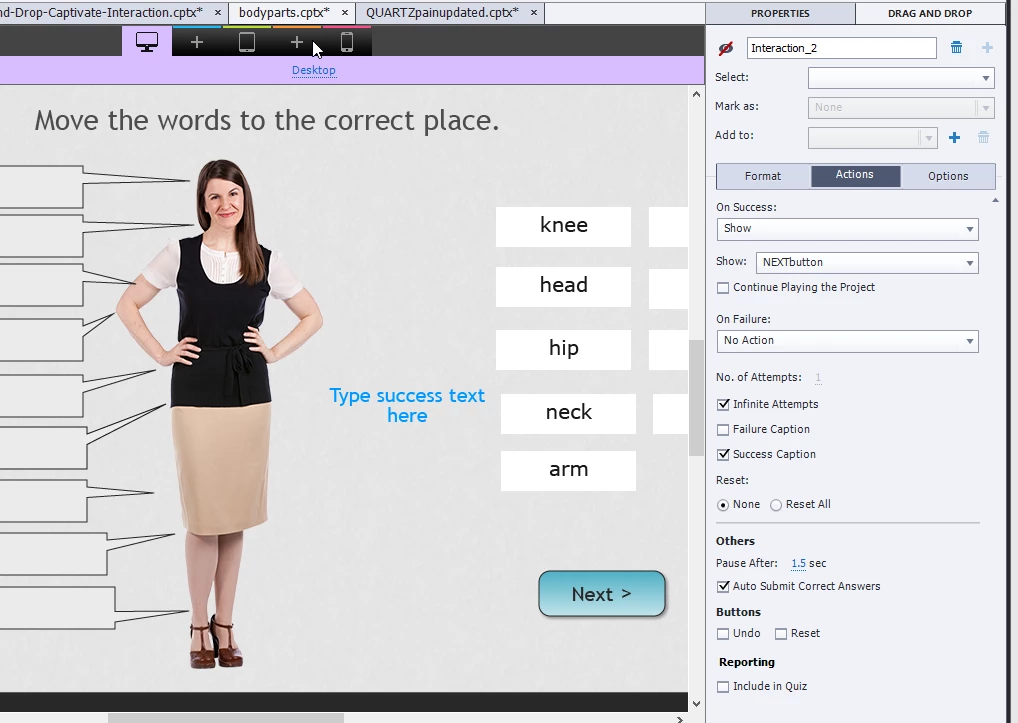
Just a tip: use the eye icon in the D&D panel to see the links, it was
unchecked in the screenshot. Links are lost when you change the name of one
of the objects. I did not understand why AutoSubmit would cause this
problem, since you talked about a custom Next button.
Copy link to clipboard
Copied
Are you using the InBuilt states in Captivate 9? Can you post a screenshot of the timeline as well? I suppose this is a custom Next button, not a button that is on the first slide and timed for the rest of the project.
Copy link to clipboard
Copied
thanks for the response. but I finally found the problem!! it turns out that for some reason, when I went to "set correct answers" - two of the shapes were not there (during editing, the line connecting the drag source to the correct drop target got removed). So the user was never actually getting the interaction completely correct. It's funny, I hadn't noticed the "set correct answers" feature before. (since you set the answers through the drag and drop feature. When I corrected the answers (added the ones that were missing), then my custom "next" button showed no problem.
Copy link to clipboard
Copied
Having 'Auto Submit Correct Answers' will cause the opposite to happen. Once the user gets the correct answers, the Next button will dissolve, there will be a perceptible pause (almost too long) and the course will progress to the next slide.
I imagine anything you are trying to program is being overridden by this setting.
Try turning 'Auto Submit Correct Answers' OFF, publish and test.
Copy link to clipboard
Copied
Thank you BDuchWorks for your reply. I was able to fix the problem - and now my Next button shows, as does my success text. I still have it set to "auto submit correct answers" adn it works fine.
Copy link to clipboard
Copied
Just a tip: use the eye icon in the D&D panel to see the links, it was
unchecked in the screenshot. Links are lost when you change the name of one
of the objects. I did not understand why AutoSubmit would cause this
problem, since you talked about a custom Next button.
Copy link to clipboard
Copied
thanks!!
Get ready! An upgraded Adobe Community experience is coming in January.
Learn more