
holgerj32698041
New Participant
November 10, 2015
Answered

Omitting bullet points from text

  • November 10, 2015
  • 1 reply
  • 612 views

Hello,

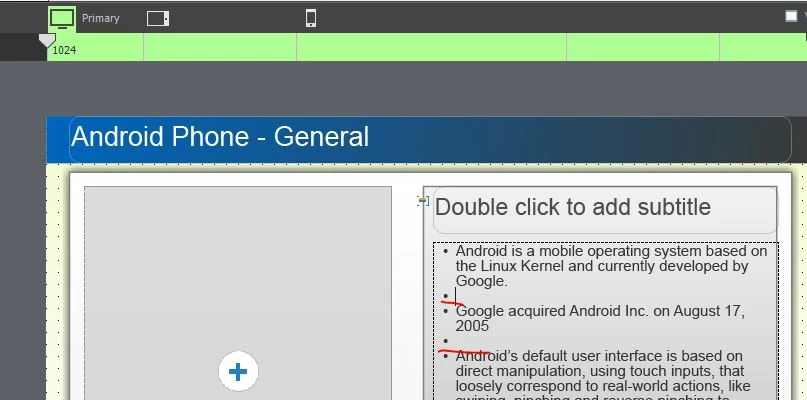
if I have created a Responsive Project and am adding captioned Text to a slide. I have bullet points in the text. How can I remove the bullet points where I have no text ? In other applications when pressing return twice, thus creating a line with no text, bullet points are omitted. However for Captivate I find no option to do this.
    This topic has been closed for replies.
    Correct answer BDuckWorks

    Have you tried Shift+Enter?

    Put the cursor at the end of a paragraph, and shift-enter to add a line without a new bullet.

    1 reply

    BDuckWorks
    BDuckWorksCorrect answer
    Inspiring
    November 10, 2015

    Have you tried Shift+Enter?

    Put the cursor at the end of a paragraph, and shift-enter to add a line without a new bullet.

    holgerj32698041
    New Participant
    November 11, 2015

    Now that is embarrassing! Looks like I have not done a lot of PowerPoint editing in a while. Thanks for pointing out this shortcut.

    BDuckWorks
    Inspiring
    November 11, 2015

    Not to pile on the embarrassment, but this is pretty standard for MS Office apps, and has become pretty common elsewhere.