

sam_amara
Known Participant
August 25, 2023
Answered

Pause and Resume Movie Without Continuing the Slide - System Variables?

  • August 25, 2023
  • 1 reply
  • 2255 views

Good afternoon, all; 


I have a slide with (slide) audio and a button on it that, in a perfect world, would allow the user to pause the slide and resume as needed. At the end of the audio the user is meant to click a click box to advance the project. At first, we tried to use the following simple advance action: 
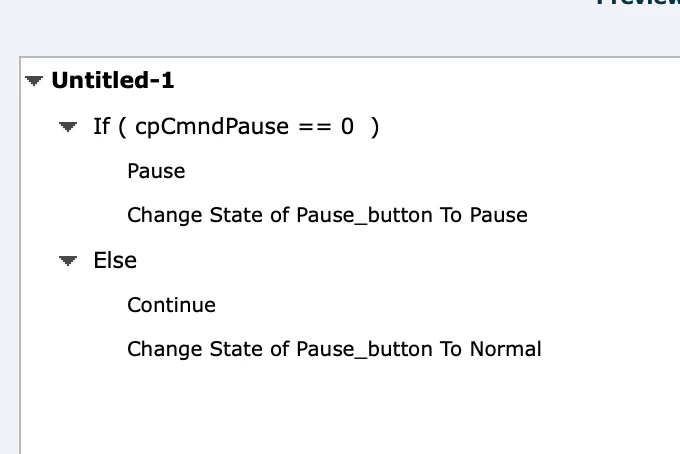
 

It works to pause and play the slide but the continue command in this advanced action seems to 'override' the pause on the click box. So if the user just pauses and then clicks play (once, twice, thrice, whatever), the project advances to the next slide, completely ignoring the pause on the click box. Here is the timeline: 



After being inspired by this blog post by our resident forum expert Lilybiri, I thought that, somehow, the system variables with pause and resume might be a solution (rather than commands of pause and continue) (though the advanced action in the blog shows a 'continue', which I think is the reason for my original problem). I don't have much experience working with the system variables, though, and I have gotten confused I think. Below was my best yet unsuccessful effort 😂💔: 
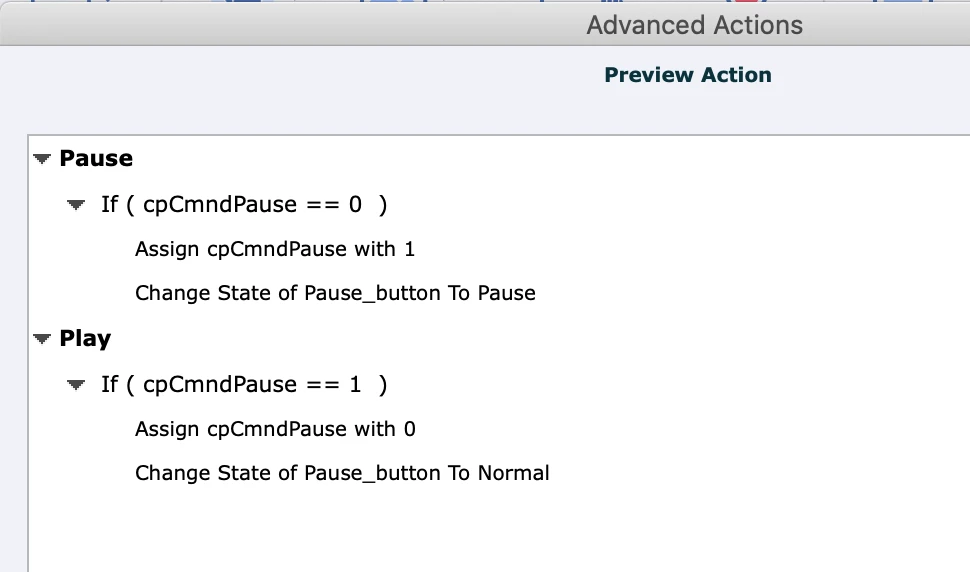


It didn't work at all 😕😕. I tried a few other combinations and managed once to the get the slide to stop but the button wouldn't change state and I couldn't restart the slide/audio 🙄. It's been a challenging afternoon, so I thought at this point I'd just come and ask if anyone has any ideas of how I can do this or if it's even possible. TIA!


samamara

    This topic has been closed for replies.
    Correct answer Lilybiri

    Not at all @Lilybiri - you take your time and do this on your own schedule. No rush at all; I appreciate your efforts and I hope fans of your blog will benefit as well. Yes, I know you're in Belgium and are, I believe, UTC+2 and I am in UTC+4 so I know it's a bit late on a Sunday night. 


    Here is 'your' blog post:

    https://blog.lilybiri.com/play-slash-pause-button-extended-classic-captivate


    1 reply

    Lilybiri
    Legend
    August 25, 2023

    Pausing the timeline can be challenging, reason why I have so many blogs about this feature.

    For the last action, I would have used Toggle cpCmndPause for both Then/Else but that doesn't change anything. The opposite system variable of cpCmndPause is cpCmndResume. Even that will not help in this case.

    May I summarize:

    • You want a play/pause button like in that interactive tutorial but
    • you don't want to move to the next slide if the playhead reaches the last frame of the slide where you have the pausing point of the click box.

    Is that correct? I will try out some possibilities and be back.

    I see that the Play/Pause button is timed for the rest of the project. Do you want this behavior on multiple slides? Why would the learner play/pause the slide? What is the exact meaning of that? Maybe you don't need a play/pause button in this case?


    sam_amara
    sam_amaraAuthor
    Known Participant
    August 25, 2023

    @Lilybiri - I'm running out of ways to say thanks for all of your efforts! Thanks again for being the first one to answer the call for help!


    To start, yes, we need the play/pause button so the learner can pause the audio as needed and look around the slide to understand descriptions, etc., before moving on (and we'll use button throughout the project). Many of the users are not familiar with the system that is being explained and may not have the language skills to listen fully to one slide. This is also the choice of those who've asked for the course, so just trying to meet that request if possible. 


    Your summary of my need is bang on of course 😃! Any ideas you have would be appreciated, honestly. I tried several combinations but I'm sure there are many options and things I don't know. 


    Thanks again!

    samamara

    sam_amara
    sam_amaraAuthor
    Known Participant
    September 2, 2023

    Thanks for the heads up. I was getting worried that you couldn't understand the workflow which I explained, but now I am happy that it worked.


    No, no...it was clear :). I just had a very busy few days and wasn't able to give it a try. Thanks again!