Participating Frequently
February 20, 2022
Answered

Please Help me (Shared Action)

  • February 20, 2022
  • 1 reply
  • 386 views

Hello,

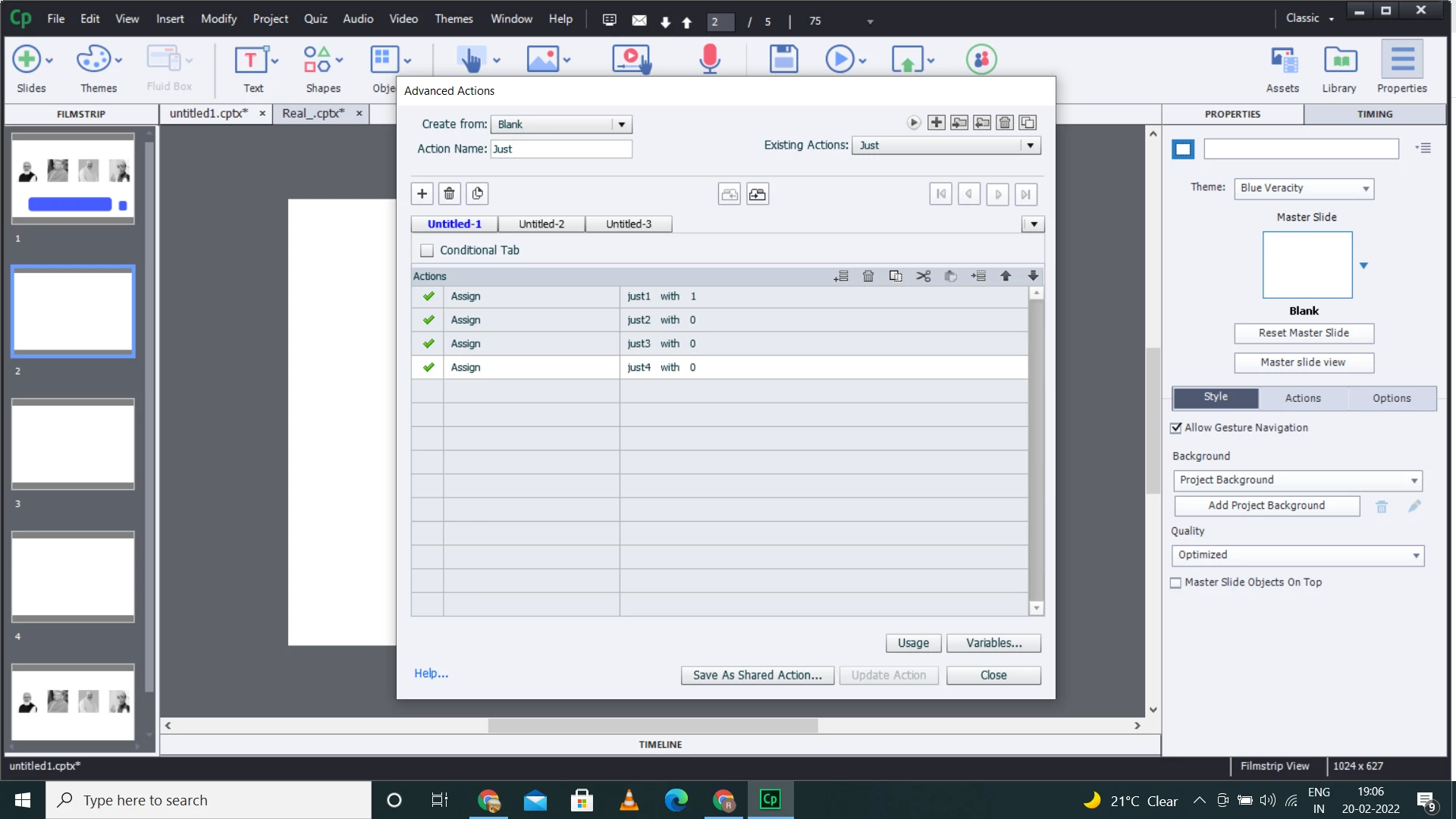
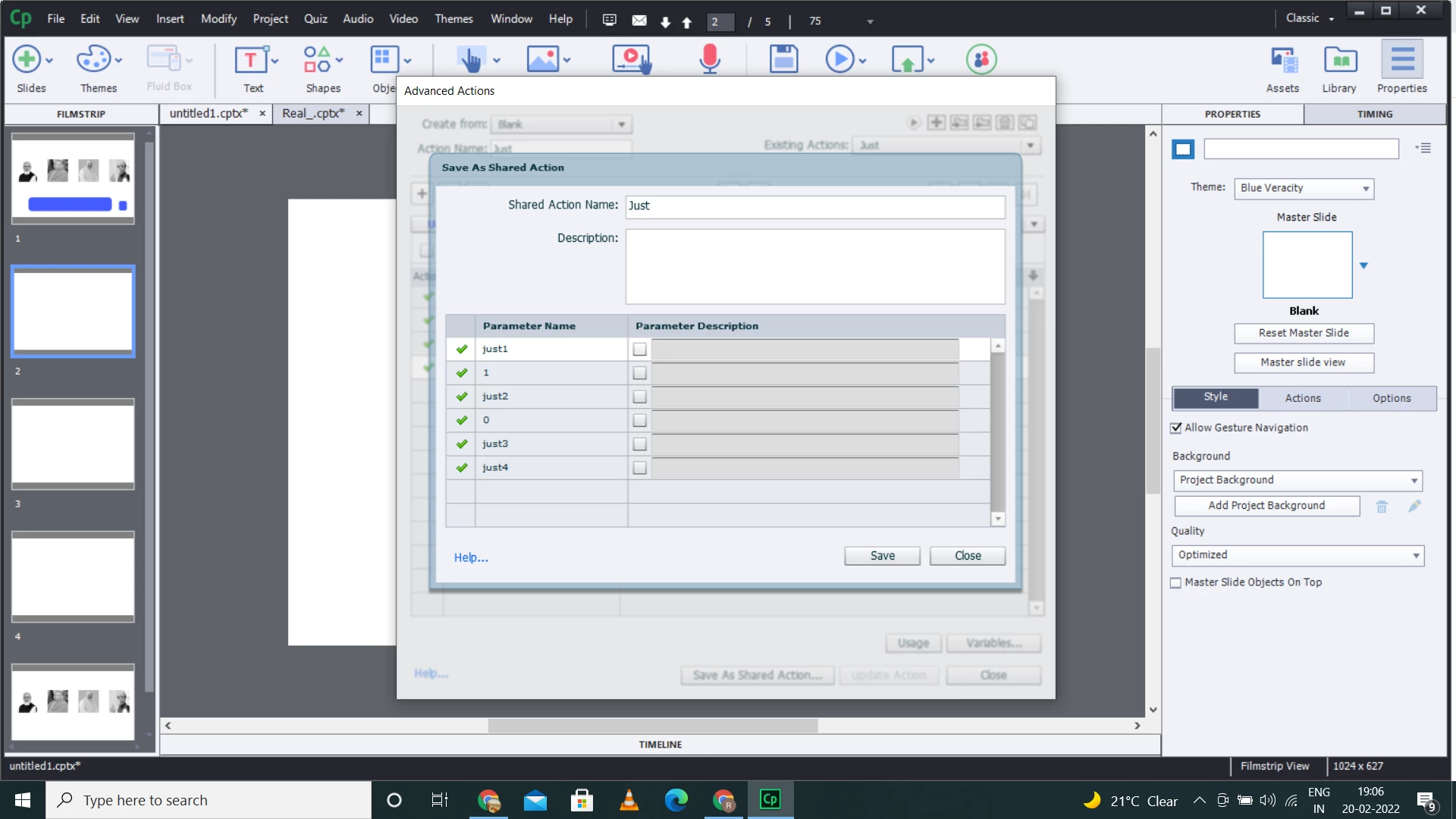
I created four variables(just1, just2, just3, just) and created a action where I assigned them values as(1,0,0,0 respectively). Now when I am using this as shared action the parameter selection is available only for first two variables and for variables (just3, just4) it is not showing up. 


I am also sharing the screenshot so that you could understand my problem.


Thanks in advance.

This topic has been closed for replies.
Correct answer Lilybiri

You need to be very careful when defining literals as parameters.  What you see is very logical: you have only two different numbers: 0 and 1. That is the reason why you see only two literal appearing as possible parameters. You would need to have at least 4 different values for those numbers.

Personally I avoid defining multiple literals as parameters for that reason, find another way to define values. Maybe this blog post could clarify a little bit what I mean. I have discussed this issue multiple times in webinars about shared actions as well:

http://blog.lilybiri.com/tip-5-parameters-shared-actions

Since I don't really know what you want to achieve with this shared action, cannot offer you a better alternative. I would use this type of shared action to be able to define the user variables quickly in any new project, never to define values for the variables.

1 reply

Lilybiri
LilybiriCorrect answer
Legend
February 20, 2022

You need to be very careful when defining literals as parameters.  What you see is very logical: you have only two different numbers: 0 and 1. That is the reason why you see only two literal appearing as possible parameters. You would need to have at least 4 different values for those numbers.

Personally I avoid defining multiple literals as parameters for that reason, find another way to define values. Maybe this blog post could clarify a little bit what I mean. I have discussed this issue multiple times in webinars about shared actions as well:

http://blog.lilybiri.com/tip-5-parameters-shared-actions

Since I don't really know what you want to achieve with this shared action, cannot offer you a better alternative. I would use this type of shared action to be able to define the user variables quickly in any new project, never to define values for the variables.
rpd1997Author
Participating Frequently
February 20, 2022

Thank You so much for your guidance. 

Actually I was creating a customised multiple choice question with 4 options. I wish to assign value=1 to the variable corresponding to the selected option and rest other should be zero.


For example if option 1 is clicked than the variable "just1" will be assigned value = 1 and at the same time all other variables will be assigned value = 0. Now when user clicks on submit button a different action runs which shows the feedback message corresponding to "just1".

Lilybiri
Legend
February 20, 2022

It is a MCQ with only one correct answer? You would attach that shared action to each of the answers? That is pretty complicated for such a simple situation. This workflow would do the same:

  • Use one variable v_answer. Set its default value to 0.
  • For the correct answer, attach the simple action "Toggle v_answer". For the wrong answers nothing needs to be done.
  • For the Submit button: create a conditional action to show the correct feedback:
       IF v_answer is equal to 1
            Show Correct                       (or use change state if you have a multistate object)
       ELSE
             Show Incorrect

You can re-use the variable v_answer on each slide, provided using the On Enter event to reset v_answer to 0.


Advantages: you only need one variable, and to attach a simple action to only one of the answers.