Known Participant
August 28, 2018
Answered

problem with tracking scores & no imsmanifest.xml

  • August 28, 2018
  • 1 reply
  • 1767 views

Hello,

We're having some troubles with the tracking of scores on an lms called "knowledge4me". The lms cannot track any scores.

Also, I cannot find any imsmanifest.xml file in the folders after exporting. Can this have anything to do with the lack of tracking?

Some important information :

- the project's format is SCORM

- users must be able to repeat the quizzes if they haven't succeeded

- users pass the course only if they get more than 75% at the quizzes


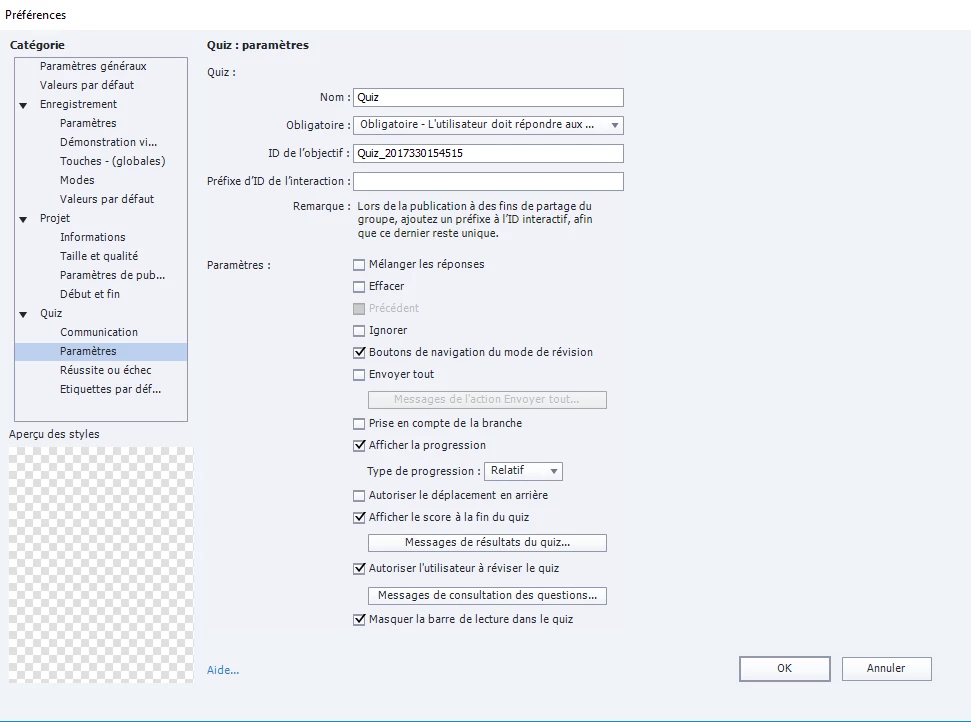
I join two screenshots so you can see the settings of our quizzes. (I'm sorry though, we work with the French version)

Thank you in advance for your help!

    This topic has been closed for replies.
    Correct answer RodWard

    What do you mean by "problem with our Captivate installation"? Could you please give me some examples of what it can be so that we can verify?

    Thank you in advance!


    First I think you should try publishing to a folder on your PC instead of going direct to DropBox.  It's quite likely that DropBox is stripping off some of the files.

    If publishing to a SCORM zip locally still doesn't result in the zip file containing the required imsmanifest.xml file at the root level, THEN worry about looking further at your Captivate installation.

    1 reply

    RodWard
    Community Expert
    Community Expert
    August 28, 2018

    Upload the same SCORM published from Captivate to SCORM Cloud online LMS and test it there. (You can open a free account for testing.)

    If the same issue is not present on SCORM Cloud then your LMS is at fault.

    The settings you show for Quiz Settings in Captivate should indeed publish out a fully compliant SCORM zip package. The imsmanifest.xml file should be at the root level of the zip file, not in any folder below that level.

    You have not shown the settings on the Quiz > Pass or Fail panel.  So, I cannot tell you if that is configured correctly yet.

    mnoemiAuthor
    Known Participant
    August 29, 2018

    Thank you for your answer, Rodward!

    Here's the screenshot of the required window :

    I created an account on Scorm Cloud but the platform doesn't let me publish the zipped folder, I have a message saying the folder doesn't have any course in it. Scorm Cloud requires that the folder have the imsmanifest.xml file (that's how I discovered my folder doesn't have it). I suppose it's the lack of this file that causes the problem with publishing, or can it be something else?

    What to do in order to have this file? What do you suggest I do?

    Thank you in advance!

    RodWard
    Community Expert
    Community Expert
    August 29, 2018

    Well if SCORM Cloud also says your zip file is not a valid SCORM package because it has no manifest then it definitely MUST be the case.  SCORM Cloud is the gold standard for LMSs.

    If the settings you have shown accurately reflect what you see in Captivate for this module, then my only other suggestion would be that something must be wrong with your Captivate installation.

    When you publish out from Captivate, do you publish directly to a folder located on your local PC hard drive, or are you publishing to a network folder location somewhere on your company LAN?

    Is there anyone else that you know how also uses the French version of Captivate as you have?  Could you try getting them to also publish the same CPTX file to see if they end up with a manifest file in the SCORM?