
Copy link to clipboard
Copied
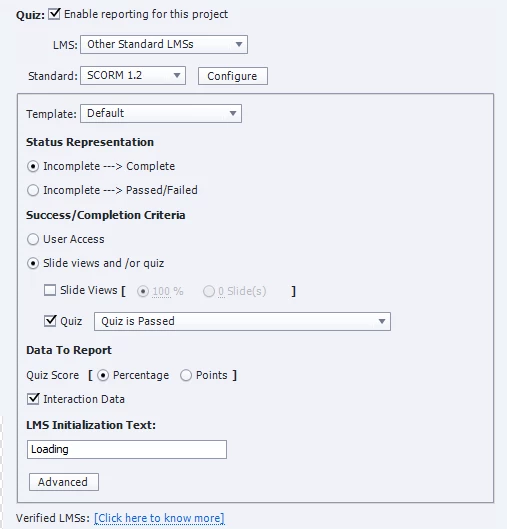
Hi, I want learners to view all the slides AND pass the quiz with 84% accuracy. The LMS should show In Progress/Incomplete until both are achieved.
With the current settings, once learners scored 84% or more, if they leave the course without viewing all slides, they get a Successful. I don't want to put more "weight" to the last few questions because they are all equally important.
It seems like if I select both check boxes, once learners viewed all slides, but they haven't achieve 84% or more in the quiz, they are also mark as Successful.
How to get both Slide Views AND Quiz is Passed to work? Not Slides Views OR Quiz is Passed.
Thank you!
Copy link to clipboard
Copied
Under Success/Completion Criteria you will also need to click the checkbox next to Slide Views and pick either 100% or the total number of slides required in order to get the results you're looking for. You will also need to ensure that your desired percentage is set up on the Preferences > Quiz > Pass or Fail
Copy link to clipboard
Copied
I have tried your suggestion before by selecting both check boxes. It seems like if I select both check boxes, once learners viewed all slides, even though they haven't achieved 84% or more in the quiz, they are also mark as Successful.
I have the score on the Pass/Fail section. My colleagues confirmed this behavior is true. Those two check boxes are mutually exclusive.
Copy link to clipboard
Copied
Paul's advice should normally be all that you need to do. If you are finding that selecting both slide views AND quiz pass as the Completion criteria is NOT working, then the issue may be with your LMS rather than with Captivate.
Try also changing the Status Representation to Incomplete ---> Pass / Fail to see if that makes a difference with your LMS. But this is not normally an issue.
I recommend you upload the same SCORM module to SCORM Cloud and test whether you are able to achieve a different result with that LMS as a comparison.
Get ready! An upgraded Adobe Community experience is coming in January.
Learn more