
Question
"Bookmark icon" in TOC?
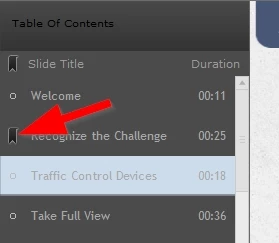
Hello all, what is the function of these "bookmark" icons in the TOC next to each slide title? I could not find anything about them on Adobe's documentation for the TOC. I cannot seem to determine what they do, or how to turn off the ability to click them. I thought it had something to do with the self-paced learning, but the ability to click them is there regardless of whether self-paced learning is on, and has no affect on where the user returns in a later session.
I hope there is a way to shut them off, because having clickable buttons without a function is confusing and sloppy UX. I would ideally like to get rid of the "bullet" icons as well that are there by default.
 AdChoices