Inspiring
January 13, 2017
Answered

Replay/Rewind slide in Captivate 9 not working

  • January 13, 2017
  • 1 reply
  • 863 views

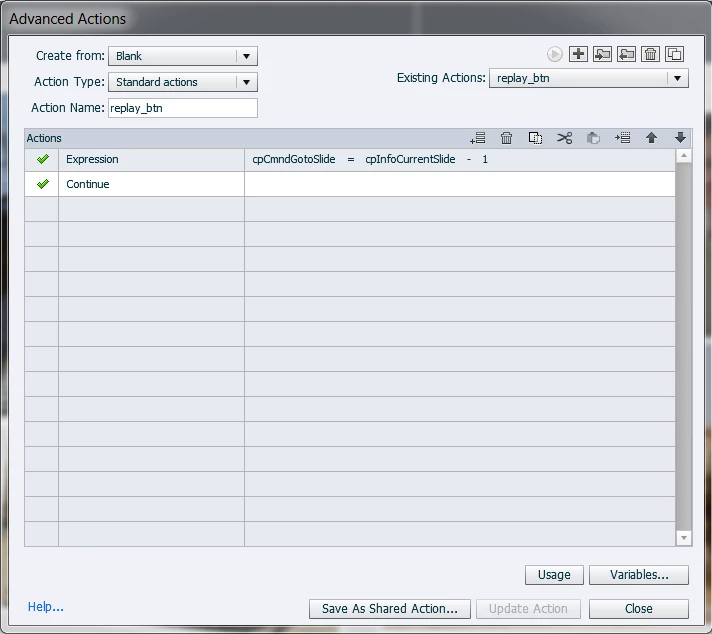
I've tried the posted solutions without success. I also tried the more complicated solution where you set a variable on Enter and set the expression based on the variable. Both solutions cause my basic animation to fail, meaning the audio plays but the animation does not. If I click pause and play a couple times, the animation will start playing. The replay/rewind function works just fine. Without animations, the course is not going to pass muster.  I'm on a PC using 9.0.2.4. Can anyone help? @Lilybiri can you help?

    This topic has been closed for replies.
    Correct answer Lilybiri

    The Replay button has a pausing point at 1,5secs. Please make it later, all objects first have to appear before that button should pause. That means that the pausing point should after 10secs

    Like many CP-users you miss insight in the Timeline. That is the reason I started to publish articles about that timeline, a sequence of 5. The first one is published both on my personal blog and on the portal. The second and the third are at this moment only on my blog, waiting approval from the moderator of the portal. Here are the links:

    Captivate's Timeline(s) Demystified - Intro - Captivate blog

    Video Demo Timeline demystified (cpvc-project) - Captivate blog

    Captivate's Timelines (master slide/normal slide cptx) demystified - Captivate blog

    1 reply

    Lilybiri
    Legend
    January 13, 2017

    Are talking about the solutions proposed in this blog post?

    Replay (slide) Button - Captivate blog

    You probably needs the second scenario described there.

    If it is not working, please give some information about what you mean by 'basic animation'? Maybe post screenshots of the timeline, because I need more information

    Inspiring
    January 13, 2017

    Yes. That is the other solution I tried. Here are some screen shots.

    The below image is the timeline. Nothing fancy. I just dumped some images on screen so I could test this without doing damage to my real project.

    The below is the final placement of the image.

    And, here's where it gets stuck. It never shows the animations past this first image.

    All I want is to restart the slide in case the learner missed something or wants to review the content.

    Lilybiri
    LilybiriCorrect answer
    Legend
    January 13, 2017

    The Replay button has a pausing point at 1,5secs. Please make it later, all objects first have to appear before that button should pause. That means that the pausing point should after 10secs

    Like many CP-users you miss insight in the Timeline. That is the reason I started to publish articles about that timeline, a sequence of 5. The first one is published both on my personal blog and on the portal. The second and the third are at this moment only on my blog, waiting approval from the moderator of the portal. Here are the links:

    Captivate's Timeline(s) Demystified - Intro - Captivate blog

    Video Demo Timeline demystified (cpvc-project) - Captivate blog

    Captivate's Timelines (master slide/normal slide cptx) demystified - Captivate blog