lucilaf76447434
Known Participant
October 20, 2016
Answered

Restarting a presentation in Captivate

  • October 20, 2016
  • 1 reply
  • 825 views

Hi,

I have a presentation I've created in Captivate that is 4 slides long. This has advanced actions to capture information on how the user clicks through a series of questions, leading to an end result. The intention is to create a "Replay" button that would bring the user back to the beginning (Slide 1) to try the quiz again, without the data from the first attempt carrying over and affecting the end result shown on slide 4.

I know this will require writing a script for an Advanced Action. I came across some useful posts for replaying the current slide you're on (that is, start Slide 4 over again) but haven't quite lucked into a post on my specific need.

Anyone have a good resource I can look at or some tips to share?

Thanks!

    This topic has been closed for replies.
    Correct answer Lilybiri

    Ok I relabeled the text items.

    The only variables I created and used are:

    v_ChoiceA

    v_ChoiceB

    Both are set to 0.

    The items that change states on Slide 5 are:

    Txt_ResultsTitle

    Txt_ResultsText

    Results_Image

    I found this approach in another post, but it simply reset slide 5.
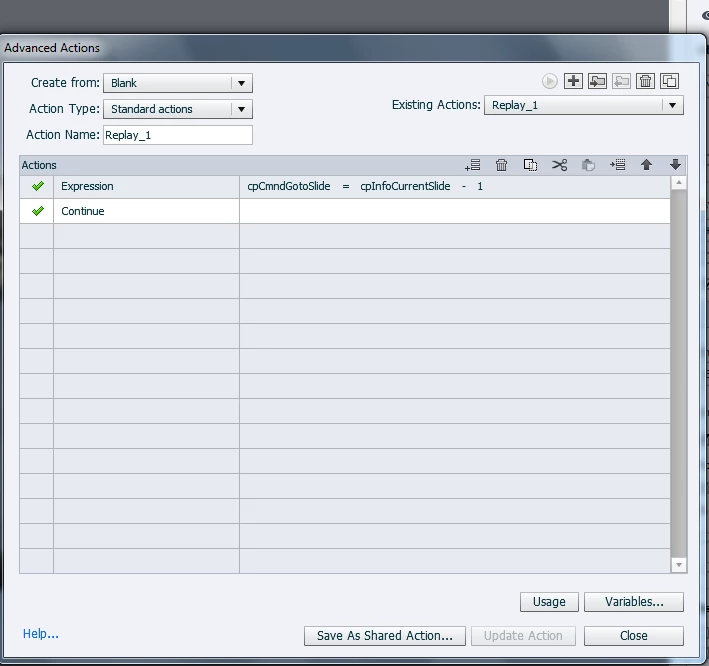
    From what you're saying, I need a script that makes the user jump to Slide 1 and resets v_ChoiceA and v_ChoiceB back to 0, as opposed to 4, as it would be by the time the user gets to Slide 5. I'm not too sure how to proceed >< Ideas?


    Such an approach will NEVER reset a slide, as I explained in that blog post rather extensively.  You do not enter the slide, which means that each script triggered On Enter will not be done at all. Did you read that post? I explained both approaches, without and with entering the slide and their advantages. For pure SWF output there used to be a simple way to re-enter a slide when replahing but I didn't mention it because it only works on SWF output.

    You need an advanced action On Enter for a slide, which can be slide 1 if that slide has already items to be reset. You could do it as well with the button that jumps to the slide, but I mostly prefer to do it with the On Enter action of the slide. For the button Replay you can keep just the command 'Jump to Slide A'. For On Enter of slide 1.

        Assign v_ChoiceA with 0

        Assign v_ChoiceB with 0

        Change State of Image_A to Normal

        Change State of Tx_ResultsTItle to Normal

        Change State of  Tx_ResultsText to Normal

    I would never work with hiding in combination with changing states: either you choose for states, or you choose for Show/Hide You can have as many states as you want for the Image and the texts, even a complete empty state for Normal. If you start to mix Show/Hide with states you'll get lost.

    1 reply

    Lilybiri
    Legend
    October 20, 2016

    You are not really talking about a 'presentation' (title is confusing) at all, but about sort of a custom quiz? Replay a slide as I explained in this post is something totally different, because only the situation of that particular slide has to be reset with the On Enter action of the slide. Most other posts or videos that you found will not even talk about resetting the situation, which was the reason why I took the time to write out two scenarios in that post

    The principle is the same: you have to reset everything: variables, eventually shown/hidden objects like feedback messages, states etc.  WIthout more details about what you have 'done' in that quiz, difficult to give more advice.

    lucilaf76447434
    Known Participant
    October 20, 2016

    Hi Lilybri, thank you for your quick response!

    Yes, to clarify I am talking about refreshing a custom made quiz. I understand that I need to refresh everything, though some help in understanding how to do this will be helpful! Your advice actually really helped in building the functionality of the quiz itself. See here for what the quiz consists of and the Increment command I used in Advanced Actions: Making a quiz from scratch, building a results page; using multi-state objects and advanced actions

    To explain my method:

    I made valuables v_ChoiceA and v_ChoiceB representing two different paths a user can take as they go through a series of four questions. If the user does not follow the right sequence than they get an "Incorrect, please try again" message at the end of the quiz.

    For each question slide, I made two Interactive Buttons. In Properties>Actions I put:

    On Success: Increment

    Increment: c_ChoiceA

    By: 1

    I set the number of attempts to: 1

    Last attempt: Continue

    On the concluding slide (Slide 5)

    I wrote a Conditional Action to show/hide different states according to whether or not the correct sequence of v_ChoiceA or v_ChoiceB was selected. This action uses IF and ELSE scripts (shown below). The "Croc" tab is the same as the "Cheetah tab" in effect, just showing the opposite states of the result items on Slide 5 (an image, a message, and a title).

    Everything works the way I want it to but I'm missing one last component: A replay button that will take the user back to Slide 1 and allow them to try again by erasing any data collected from their previous attempt.

    Let me know if you need more information to help with this! Any guidance is appreciated!!

    lucilaf76447434
    Known Participant
    October 20, 2016

    Hi Lilybiri, You're right, I have labeled the text captions in a strange way. Thank you for pointing that out, good tip to label it as Tx as opposed to v for a variable.

    I think I get what you're saying. I'll play around with your tips and comment back within the hour to see if it works.


    Ok I relabeled the text items.

    The only variables I created and used are:

    v_ChoiceA

    v_ChoiceB

    Both are set to 0.

    The items that change states on Slide 5 are:

    Txt_ResultsTitle

    Txt_ResultsText

    Results_Image

    I found this approach in another post, but it simply reset slide 5.

    From what you're saying, I need a script that makes the user jump to Slide 1 and resets v_ChoiceA and v_ChoiceB back to 0, as opposed to 4, as it would be by the time the user gets to Slide 5. I'm not too sure how to proceed >< Ideas?