
danielb51742821
Inspiring
January 8, 2018
Question

Resume data issue

  • January 8, 2018
  • 2 replies
  • 2400 views

Captivate 9.0.2.437

So it took me some time to get the pop up for "Continue from where you stopped last time?" .  We are using moodle LMS.

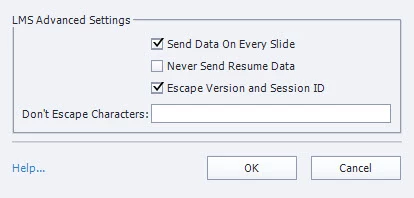
I added TOC, set used self paced and unchecked Never Send Resume Data.

Now with the pop up, the OK button on the pop up brings me to pretty close to the last slide I left. However, I expected Cancel to start the activity over from slide 1, but it brings me pretty close to where I left off. In my test case it was the 2nd to last slide out of 35 slides.

How can I receive this pop up with the option and start the lesson over from slide 1?
    This topic has been closed for replies.

    2 replies

    Erik Lord
    Inspiring
    July 9, 2018

    Agreed that 'Self-Paced Learning', misleadingly, should not be used with an LMS. As I understand it, that option stores a cookie on your computer for tracking. If no LMS, then that self-paced option may be fine.

    However, that resume dialog should NOT only be available with Self-Paced Learning.

    If you don't have that option checked, and also do not have 'Never Send Resume Data' checked, then your SCORM course should send 'suspend_data' to the LMS.

    When you relaunch the lesson, it should ask the LMS for that suspend_data value and pick-up that last slide...and if the 'cmi.exit' option in the LMS is also set to resume...the CP lesson should show that resume dialog and either return you to the last visited slide (as recorded in suspend_data) or return you to the beginning.

    However, I've not tested that in the most recent of CP so maybe things changed or there's a bug...?

    TLCMediaDesign
    Inspiring
    July 17, 2018

    I have never seen a resume dialog in any version of Captivate unless you use the self-paced learning.

    I've always created my own to give the users the option.

    Captivate itself will automatically return to the point where you left off, not the furthest progress in the course.

    Because the actual location in the SCO is stored in the lesson location, that is where Captivate will return you regardless of whether resume data is sent or not. The resume data stores your variables and progress so I would always have that turned on.

    Inspiring
    July 17, 2018

    Thanks. I ended up using a simple box that is only visible if you return to any but the first slide that prompts the dialogue.
    So problem solved. Self-paced learning indeed is not for LMS as I understand now!

    Inspiring
    January 9, 2018

    My understanding is that this pop up, activated by ticking the 'Self-Paced Learning' checkbox in the TOC settings, is not meant to be used in an LMS environment with LMS Bookmarking active ('Never Send Resume Data' ticked) and would not work reliably there.

    With our LMS (Cornersone on Demand) I experience the same as you: it will always jump me to where I left off last time, regardless if I click OK or Cancel.

    'Resume' functionality apparently is managed solely by the LMS, which kind of overrules 'Self-Paced Learning'. Some LMSs might bring up a pop up on their own account while others don't (like yours and mine).

    i ended up creating my own pop up within the courses with SmartShape Buttons and Advanced Actions for that purpose.

    Inspiring
    July 9, 2018

    Hi, I also need to get it working on COD.
    How exactly did you do that?
    Could you kindly screen shot the AA you created?

    Inspiring
    July 9, 2018

    Well, here's what I do:

    • Switch off 'Self-Paced Learning' in the TOC Settings, disabling Captivate's built in Resume dialog
    • Build my own dialog from SmartShapes; e.g. like shown here:
    • Group all objects making up this dialog, so the whole group can be hidden with one action. Time the whole group to be displayed for the rest of the project.
    • Put an Advanced Action on the 'Resume' (Yes) button that hides the dialog and continues:
    • Put an Advanced Action on the 'Restart' (No) button that hides the dialog and jumps to Slide 1:
    • Put an action on slide enter first slide to hide the whole 'ResumeRestartPrompt' group.  You might also put this action on enter of any other slide where you would not want the dialog to appear on course relaunch; e.g. on quiz slide.

    If the course is launched first time, this last action will hide the dialog right away on enter first slide and it remains hidden as long as the session lasts.

    If however the course is relaunced, Cornersone's LMS Bookmarking jumps to the last visited slide, bypassing the OnEnter action on the first slide, so the dialog remains visible and pauses the slide with the buttons' pause points, waiting for the learner to make a choice.

    One catch: If you have content that plays independently from Captivate's timeline (event video, imported PPT slides, delayed actions, etc.), this will not pause but keep playing beneath the dialog's lightbox.