Known Participant
May 24, 2011
Question

SCORM 1.2 Complete/Pass/Fail Status Reporting

  • May 24, 2011
  • 2 replies
  • 7513 views

I am have a great deal of trouble getting proper reporting. Here are the details:

We are using EX LCMS and SCORM 1.2

Captivate 5

The goal is to have the courses report incomplete (with no score but I'll settle for Zero) until the user has attempted the Quiz at which time the Course should report Pass or Fail and the appropriate Score.

I WAS getting these results a couple of months ago using the following settings:
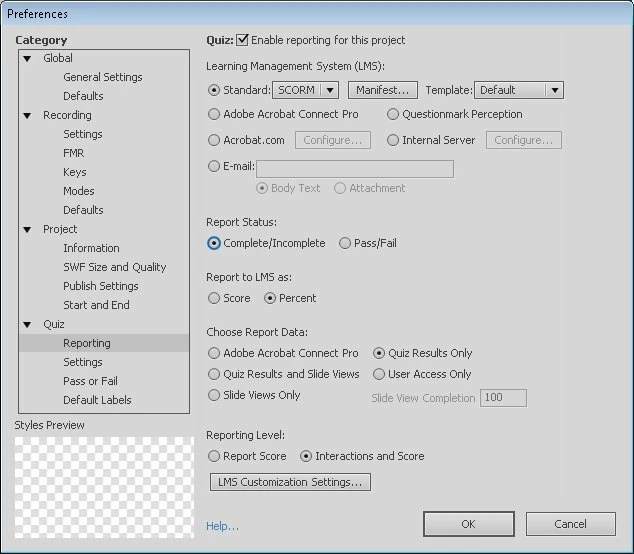
That is no longer working. The LMS people said they haven't changed anything...

They have set up an account for me that has a debugger that spits out everything that Captivate hurls their way. Eye opening.

They (LMS) can override and it is in their programming to do so - to set a Pass/Fail when the course sends a "Complete" status. But what I have observed is that Captivate only sends a complete status when the student PASSES the Quiz so we will never actually see the failed status because Captivate persists in sending "incomplete" until the quiz is passed.

I am finding other problems with the data that captivate is sending (or in some cases not sending) but this is the most serious problem and I need to find a solution/combination of settings to get the proper output. There doesn't appear to be any detailed documentation on settings and the resulting SCORM output.

This topic has been closed for replies.

2 replies

Known Participant
July 28, 2011

After a lot of trial and error and some help from the folks at EZ LCMS, I have settled on the settings below. This gets me the complete/incomplete status until the student has taken the quiz, then I get a Pass/Fail status and the score. I can still find no documentation from Adobe on any of these and what settings produce what output, but the help on the other end resolved it. I have also discovered that Captivate's resume data is not very friendly and so have decided to turn that off.

Participating Frequently
August 6, 2011

This post was very timely as we have been looking for a solution for just this problem since our conversion to the PeopleSoft ELM environment.

These settings are spot on and enabled us to close a few open issues we had with Captivate course/post test combinations.

Thanks for posting!

Chris

Participant
May 24, 2011

Regarding the documentation on settings, I watched this webcast on the Captivate Blog earlier and it was fairly helpful in that regard:  http://blogs.adobe.com/captivate/2011/04/navigating-the-lms-maze-with-adobecaptivate.html#more-2209.  Based on what they covered there, I'm somewhat doubtful that SCORM 1.2 will be able to support the functionality that you're talking about without the override from EX.

Instead of overriding and setting Pass/Fail based on a "Complete" result, could you set an override based on score?  That is, if no score is reported (i.e. you haven't taken the quiz yet) then it sticks with incomplete, but once a score is transmitted the override kicks in to set Pass/Fail.

Known Participant
May 25, 2011

I thank you for your reply and suggestions, (I have watched that webcast several times trying to eek out information helpful to my mystery)

I don't actually have any control over how my LMS system reacts to the data. But your ideas are great if I could base my templates on Score rather than Percentage (not my decision) and if I had any control over how the data was handled (I don't).

I'm stuck between Captivate output which isn't well documented, and EZ-LCMS which isn't well documented. Both "Black Boxes" and I'm trying to figure out the correct settings so that the results make sense to the Students and to trainers and department heads. Sometime in the last couple of months the processing on one or the other changed and no one will fess up. I don't know what to change, because I can't find a list of how the different settings effect output. ie. these settings will give you this output. these settings will produce a "complete" status under these situations. etc. Basic information that I can't seem to get no matter how many different avenues I try.

RodWard
Community Expert
Community Expert
May 26, 2011

The thing you have to remember about using the Report as SCORE option in Captivate is that it has a lot of downsides, there are lots of traps when setting it up, and it's a constant maintenance worry forever after.  The other issue is that many LMSs just don't work well with it.  They expect a percentage.

In SCORM terms you would be reporting what is known as the RAW SCORE, or in other words, it's the exact number of points that the user has accumulated by the end of the module.  The SCORM standard for 1.2 specifies that this RAW SCORE score should be "normalized" to fall somewhere between 0 and 100.  (So a SCORE value above 100 is not permitted.)

The next problem is that if you build your course so that it has a certain number of scored interactions that can give you a maximum score of say 35 points, then for your user to score 100% you need to set the other Quiz >  Pass/Fail options in Captivate to match this number of points exactly by setting the number of points required to pass as 35 (for a 100% pass) or something less than this (if you wanted the required pass to be lower).  So instead of just being able to dial in the passing percentage, which is easy if you report as percentage, using SCORE means you'd need to do some math every time you change the number of points in the lesson to ensure everything is still balanced up correctly.

However....the really bad news is that even if you DO set everything up properly inside Captivate, some LMSs will see your RAW normalised SCORE and then proceed to interpret it as if it was a percentage.  So a user that scored 35 points in your course, which should be 100%, will be told that they got 35% and failed.

If there is some mandate in your company that stipulates using RAW SCORE...and your LMS interprets it correctly...and you don't mind all the extra setup and maintenance and risk it gives you, then by all means go with it.

But if you want an easier life, just use Report as Percentage.