jnifferg
Inspiring
November 25, 2013
Answered

SCORM Manifest Information Shows in LMS

  • November 25, 2013
  • 3 replies
  • 5345 views

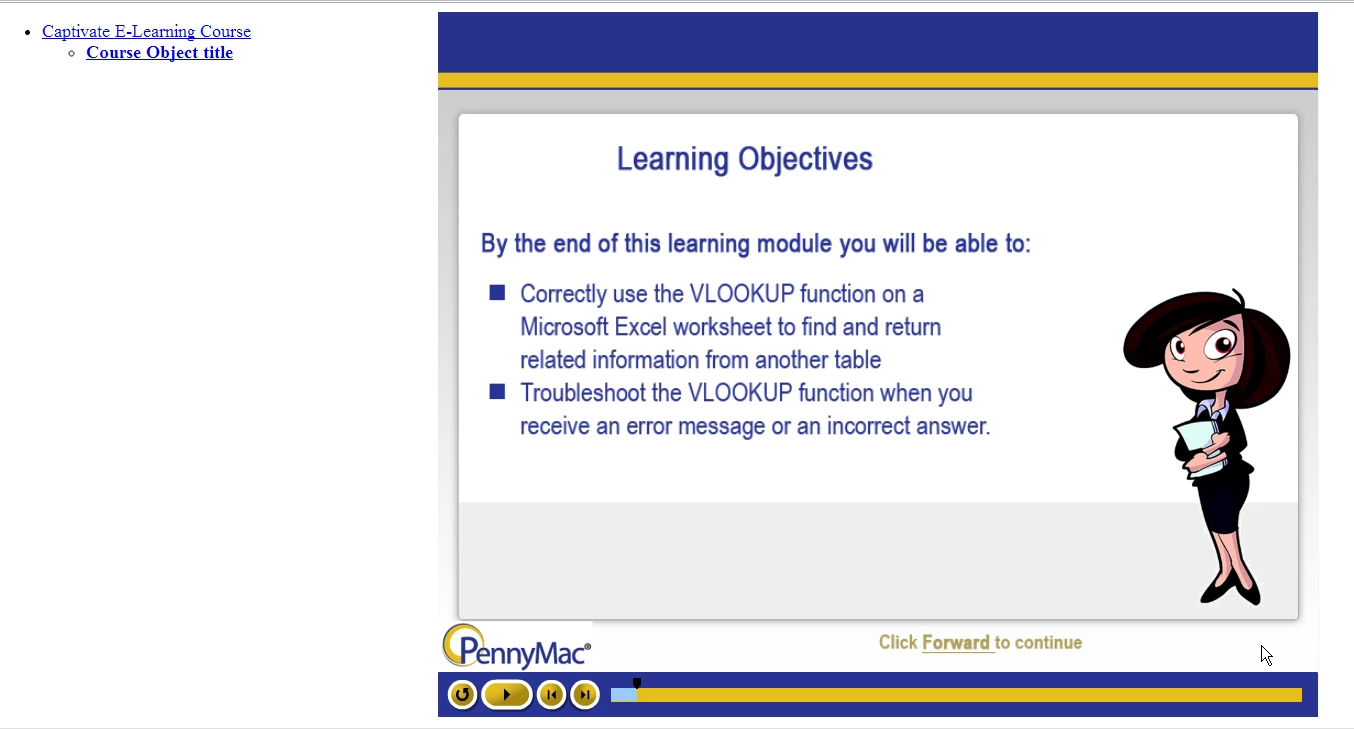
We are uploading courses to our LMS (Cornerstone). When we launch the file, there is a section to the right of the actual course that appears to show information from the SCORM manifest file.

I have not been able to figure out if this is something I can turn off from either Captivate or from Cornerstone, but I know we don't want it to show (it looks messy, and takes up a lot of the screen).

Screen shot is below -- has anyone had this issue before and been able to remove it?

Much appreciated!

    This topic has been closed for replies.
    Correct answer Mobywahn

    Not too late to the party -- all help is welcome!

    1) Brain got backwards; I meant my "other right." You are correct that I am referring to the window at the LEFT of the course screen.

    2) Whether I have the course and module titles entered in Captivate does not seem to make a difference here (I have tried adding them, and removing them) -- the window still shows, it just either shows the names, or some default text.  It's not formatted, and frankly, kind of ugly when you compare it to the nicely formatted course.

    3) Cornerstone does not give us an option to launch the content in a new window or embedded in the page. The default is to open in a new window, but still shows the frame at the left. BUT -- only when I publish using SCORM 2004.

    4) As for the last, I am referring to some of the other discussions, where it is suggested that to fix the tabbing issue, I/we add a line of text to HTML file generated by Captivate. However, the code that I'm supposed to look for does not exist. The HTML code looks like it just calls up the Javascript for the SWF, so not much help.

    THAT SAID -- I have tested a few combinations, and I think I found one that works.

    SWF, SCORM 1.2, DISABLE ACCESSIBILITY    

    Disabling Accessibility may have taken care of the tabbing issue.  I'm in the process of having other people test the course, so I'll keep my fingers crossed.


    Hello jnifferg,

    Looking at Cornerstone's "Course Publisher", it states: "Cornerstone supports all properly formatted SCORM v1.2 courses up to 250MB..."

    Perhaps you can contact your Client Success Manager and see if they are capable of publishing SCORM 2004?

    Hope it all works out!

    -Michael GJ

    3 replies

    jnifferg
    jniffergAuthor
    Inspiring
    January 16, 2014

    Okay -- latest update:

    • Module works in CHROME when published in SWF, SCORM 1.2
      • Phantom window is not there
      • Rollovers work
      • Tabbing works in the simulations
    • Module does not work in IE 10 when published in SWF, SCORM 1.2
      • Phantom window is not there
      • Rollovers work
      • Tabbing does not work in the simulations, which effectively stops the training
    TLCMediaDesign
    Inspiring
    January 16, 2014

    When you publish there is a checkbox for Seamless Tabbing in the Advanced section. Did you try that?

    jnifferg
    jniffergAuthor
    Inspiring
    January 16, 2014

    That option is available in Captivate 7. I am using Captivate 6.

    RodWard
    Community Expert
    Community Expert
    November 26, 2013

    Most LMSs give you very little control over the appearance of their TOC.  If Cornerstone does give you skins for the TOC that's great, but you are the best one positioned to render judgement on whether or not it looks better.

    RodWard
    Community Expert
    Community Expert
    November 26, 2013

    That's the Table of Contents (TOC) for the SCORM player in the LMS.  Since you only have one module in your course that's what it's showing.  You cannot control this from Captivate.  You need to investigate your LMS settings to find out if the TOC can be turned off.  It can in other LMSs.

    jnifferg
    jniffergAuthor
    Inspiring
    November 26, 2013

    Thanks -- we'll take a look.

    As another option, then -- if we aren't able to turn it off from Cornerstone, if I publish with a TOC that matches the Captivate skin, will it at least look better? (I'll test that, too...)

    Participating Frequently
    January 16, 2014

    I'm coming back to this issue after a few months because it is seriously impacting a project I am trying to publish for a client. 

    • If I publish as SCORM 2004, I get the screen pictured above.

    • If I show the TOC with a customized skin (via Captivate), I get the screen shown to the right. (TOC is pretty from Captivate, but I still get the extra window at the left.)

    • If I publish as SCORM 1.2, the extra window goes away, but I lose Seamless Tabbing, which completely screws up the tutorial, which uses Tab to enter data into the fields.

    Cornerstone does not have an option to turn anything off when uploading a eLearning module. Even if they did, the fact that the screen disappears when publishing as SCORM 1.2 implies that there is something going on with the SCORM 2004 publish that is different.

    I have read other threads that tell me to add a line to the SCORM 1.2 HTML file to fix the seamless tabbing issue. However, the HTML file simply routes out to the javascript file, so that can't be done.

    And, although HTML 5 is a preferred solution, Captivate's HTML 5 version does not support rollover captions, which I use in my tutorial.

    Do I have ANY other options here? I would very much appreciate some help. 

    Thank you.


    Hello jnifferg,

    I am the Admin for our Cornerstone account and publish often.

    I cannot find anything within my Admin reach.

    And, I have exclusively published via SCORM 1.2.

    A couple of questions for you:


         Does the phantom window appear when you publish & view locally?

         Have you published via Cornerstone previously and NOT seen the phantom window?

    You may want to reach out to your Cornerstone "Client Success Manager"

    Good Luck!

    Michael GJ