Setting the slide duration via “properties->timing” tab
Hi,
I have an issue with setting the slide duration via the properties area. Very often I want to reduce the duration of a slide to the point right AFTER the mouse object ceases its movement, i.e. 0.1 seconds later. When I type in the desired value in the “timing” tab, on some slides the duration does not change. Increasing the slide duration works always but I can’t reduce the duration.
The mouse is in these cases the only object with a definite timing, so it seems there should be no problem. Most often the only other object is a highlight box with a variable timing ending simultaneously with the slide. I added a screenshot for an example timeline where I would like to reduce the slide duration to 2.4, but it does not work.
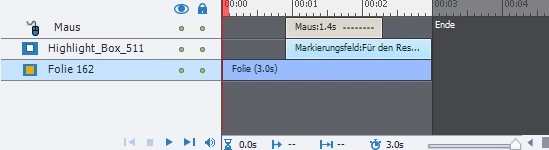
When using drag&drop directly in the timeline, I can decrease the duration to the desired point, no problem. However in projects with many slides it would be much easier to be able to type in the specific time in the “timing” tab in the slide properties.
The problem occurs virtually in all the software simulations that I work on, but only on like half of the slides. Recordings were made with different Captivate versions on different PCs. Since I fail to see the difference between these slides, I am at a loss.
Hope you can help, thanks in advance!
 AdChoices