
Participant
July 19, 2022
Question

Slide Video always with shadow in Captivate 2019

  • July 19, 2022
  • 1 reply
  • 144 views

Hello,

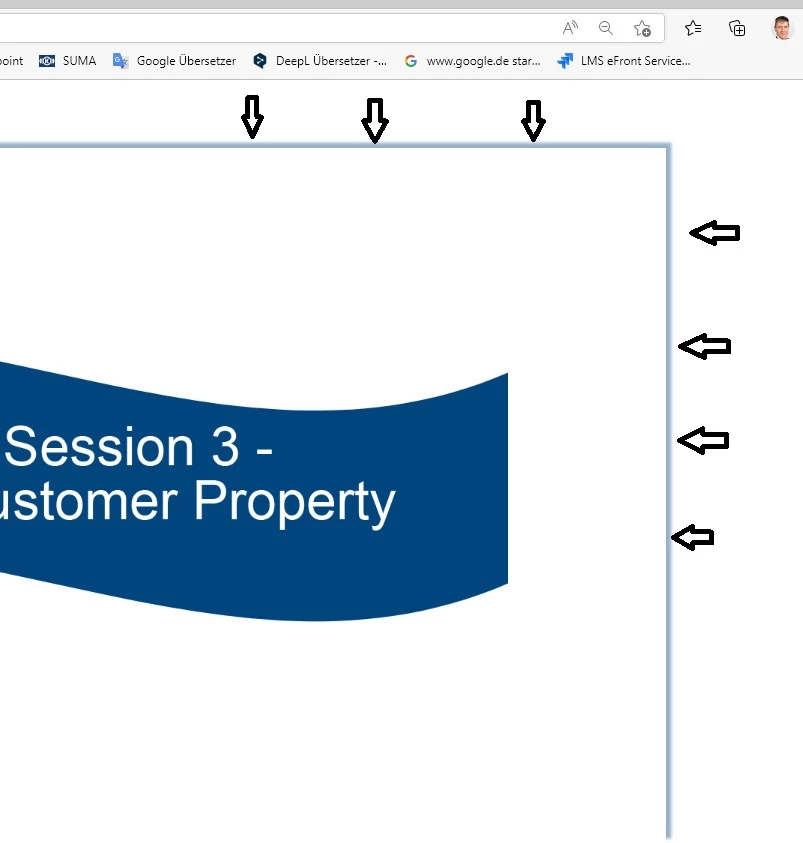
When I insert a slide video, there is always a shadow around it in the HTML output, even if I don't have it enabled.

Also, the shadow doesn't disappear on the following slides even though the video was only shown on the previous slide.

What can I do, to prevent/ delete the shadow?

Thank you very much, Jörg
    This topic has been closed for replies.

    1 reply

    Lilybiri
    Legend
    July 19, 2022

    Please always use the full version number because CP2019 had a lot of releases, main ones being 11.0, 11.5 and 11.8. You find the full version number under Help, About Captivate.

    Can you check the master slide used to insert the slide video? Which theme do you use?

    Joerg Sz.Author
    Participant
    July 19, 2022

    The version is 2019 Release 11.8.0.586. I use the  Blank master slide with some own objects.

    Lilybiri
    Legend
    July 19, 2022

    Are you on Mac? 

    Blue Veracity (theme) has no Blank master slide, so it is a custom master slide. Did you create this master slide in this version of Captivate? Could you post a screenshot of the Timeline of that Blank master slide?

    Some suggestions to figure out the cause:

    • Re-encode the mp4 with Adobe Media Encoder (H264) before inserting it as slide video. To find out if the cause is the video.
    • Apply another theme created in this version, packaged with Captivate. A theme which has a real Blank master slide to find out if the problem is due to the theme.