
Participant
March 16, 2014
Answered

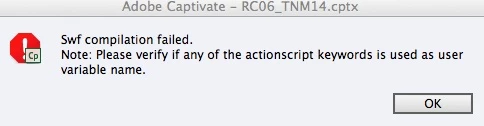
SWF Compilation error in Captivate 7

  • March 16, 2014
  • 2 replies
  • 928 views

I use Captivate 7 on mac 10.9.2. I am getting that infuriating error message "SWF compilation failed: please verify if any of the actionscript keywords is used as a variable name" .I have successfully completed 5 projects and put them up to Blackboard using SCORM 2004 with no problem. This looks exactly the same but dies at the first slide which will not preview in webrowser, but from slide 2 it shows lots of five slides with no problem. There doies not appear to be any actionscript keywords as a variable name - only 5 user variables and they're all the pre-laoded ones.  Any ideas? This seems to be a common problem but the forums don't seem to have an answer.  If anyone can crack this they will be a small hero.
This topic has been closed for replies.
Correct answer RodWard

Don't believe everything you see in Captivate error messages. The issue may not necessarily be an actual variable name.  It could be related to the name of an advanced action, a screen object, or even a slide.  If the name of any object happens to transgress into territory of actionscript keywords it can cause an issue. 

The other thing that can sometimes cause these errors is using punctuation characters in names or fields or even CC text.

From what you describe, the issue would appear to be related to something on either the first few slides or else something that gets loaded right at the start of the project.

What happens if you hide the first few slides?  Does it then publish without issue?

2 replies

Participant
March 16, 2014

Dear Rod

You were very helpful and i did as you suggested: hid the first slide and previewed the file and all was well.Then I created a new slide as Slide 2, and  I cut and copied all the bits from the dud first slide to the new slide,  and then deleted the first slide. All is well with the composite!  But I am no closer to understanding WHY this happened!  I couldn't see anything different between the two slides. So anything that might help in future to comprehend not merely amend would be great. I can see Captivate is clunky and from an ancient period, with aggregations of fixes and tweaks, but the same rusty undercarriage.

Again many thanks


Andrew

RodWard
Community Expert
Community Expert
March 16, 2014

Sometimes some element in Captivate gets corrupted and you can get all kinds of weird behaviour as a result. 

In most cases it's relatively simple to track down the cause (as you just saw) once you know what to do.

I have a list of troubleshooting suggestions here:

http://www.infosemantics.com.au/adobe-captivate-troubleshooting/basic-troubleshooting-techniques

RodWard
Community Expert
RodWardCommunity ExpertCorrect answer
Community Expert
March 16, 2014

Don't believe everything you see in Captivate error messages. The issue may not necessarily be an actual variable name.  It could be related to the name of an advanced action, a screen object, or even a slide.  If the name of any object happens to transgress into territory of actionscript keywords it can cause an issue. 

The other thing that can sometimes cause these errors is using punctuation characters in names or fields or even CC text.

From what you describe, the issue would appear to be related to something on either the first few slides or else something that gets loaded right at the start of the project.

What happens if you hide the first few slides?  Does it then publish without issue?