


- Home
- Captivate
- Discussions
- Re: Tabbing from one text box to another on the sa...
- Re: Tabbing from one text box to another on the sa...
Tabbing from one text box to another on the same page

Copy link to clipboard
Copied
I have a screen/slide where I have several text boxes to capture values assigned to variables. My variables are working perfectly. Navigating these boxes, however, is not.
When testing or even after publishing, the user must click to enter each text block and their information. This is counter to 508c requirements. I need the user to enter information to text block 1, use the TAB key to move to the second text block and so on until all 6 text blocks and variables have been entered before the click the button to continue in the lesson.
I have tried suggestions provided by many SME's in this forum and others but cannot get these text blocks to work using the TAB key. I cannot deliver the product until this has been fixed. How do I tell Captiavate that once the data is entered in one text block, to set focus on the next using the TAB key?
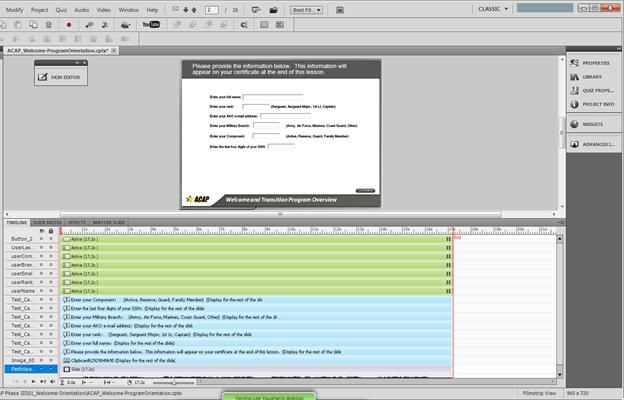
Properties for each item:
Retain Text - checked
Show Text Box Frame - Checked
Var Associated - assigned
On Focus Lo... - No Action
On Success - Continue
Attempts - Infinite is checked
Shortcut - Tab
Displayed for duration of the slide
Transition - None
PLEASE HELP!


 4
Replies
4
4
Replies
4


Copy link to clipboard
Copied
What steps have you tried till now?
Have you tried this step :--
http://kb2.adobe.com/cps/403/kb403160.html
Seamless tabbing is on by default. You can turn it off with a simple edit of your published lesson's .html file.
- Open the html file in Notepad.
- Locate the line that defines your flash movie. It will look similar to:
var so = new SWFObject("youProjectName.swf", "Captivate", "640", "511", "10", "#CCCCCC"); - Right after that line, insert this line:
so.addParam("seamlessTabbing", "false"); - Your code will now look similar to this:
var so = new SWFObject("yourProjectName.swf", "Captivate", "640", "511", "10", "#CCCCCC");
so.addParam("seamlessTabbing", "false");
Thanks,
Anjaneai
Copy link to clipboard
Copied
Hi Anjaneai, unfortunately your solution did not work.

Copy link to clipboard
Copied
lgblake,
Tabbing in Captivate is obviously tricky (and extremely frustrating). I tried to replicate your problem with the settings you described, and tabbing worked just fine in preview. (I would, however, suggest that you change the "on success" to "no action" -- you don't want Captivate to reach the end of the slide, pause, and then continue after a Tab before the user has a chance to fill out all the fields and click the button.)
I'd like to add to Anjaneai's suggestion that if you get the tabbing working but the order is strange, it's worth checking out the free demo version of the Tab Order widget that you can find here: http://www.dorna.nl/taborder-widget-en/, since it looks like you're using either Captivate 5 or 5.5. This might help with any problems with it moving to the right field (and who knows, maybe it'll force things to work correctly).
You don't mention the dreaded yellow highlights (what happens when Captivate/Flash tabs to an element like a button or the playbar), but maybe check out http://forums.adobe.com/message/3515968#3515968 if you haven't already read it.
Sorry if these suggestions are repetitive; I know there are lots of threads that cover things like this, and you said you'd tried lots of things already.
Copy link to clipboard
Copied
ElaKat, your solution worked. Using the widget will work for my project. I did have to layer it below the Continue button in the timeline though or the slide just continued straight to the next one without giving me time to enter all the data. Thank you and if there is ever a permanent fix for this please let me know!


Get ready! An upgraded Adobe Community experience is coming in January.
Learn more
 AdChoices