


jackb93304284
Known Participant
February 6, 2019
Answered

Text Entry works within Captivate but not SCORM Cloud

  • February 6, 2019
  • 1 reply
  • 840 views

Hi folks,

If anyone could shed some light on this I would appreciate it.

Fairly simple, I have some text entry boxes where you would need to put in a specific word to move on. This works within Captivate but as I preview within the SCORM cloud it doesn't work. Not too sure how it can work in one and not the other.
    This topic has been closed for replies.
    Correct answer Lilybiri

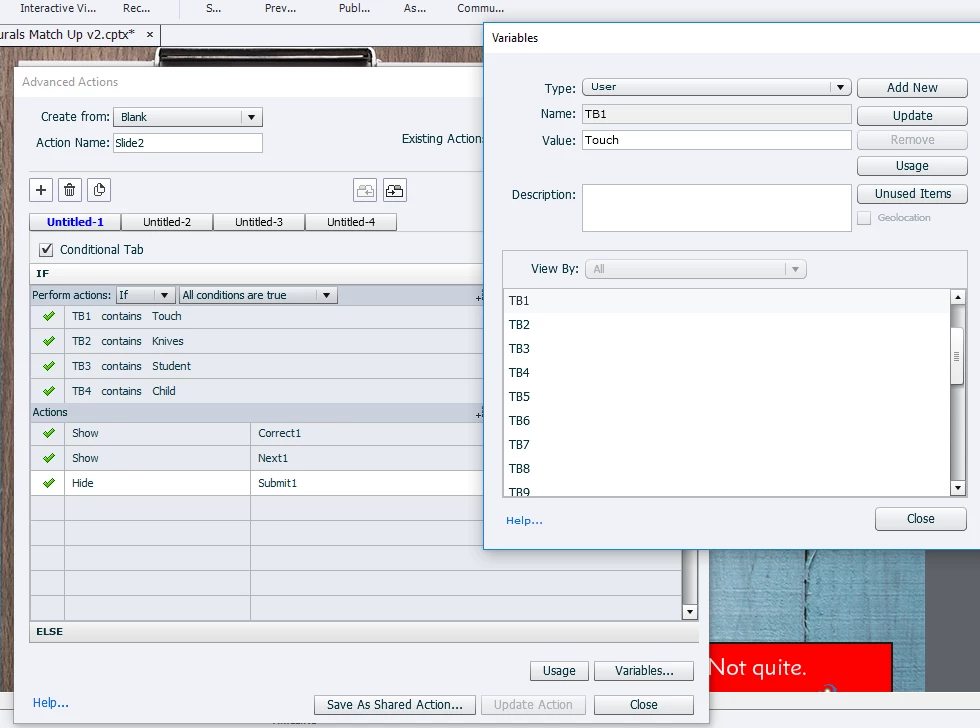
    I am working with multiple TEBs. Sorry for the confusion, I did mention in my last reply that the screenshot attached was just a simplified example of the issue I have and it wasn't my full project. Attached now is a screenshot of my full project. I can confirm if I change 'Touch' to just lowercase it works but I need it as a Capital. I have also tested your suggestion just to see if it works on using the Validation feature for just one TEB, again it works with lowercase touch and not with a Capital T.

    Thanks.


    Just try once with 'is equal to' instead of the less strict 'contains'. However it looks like Touch with a capital is considered to be a keyword in SCORM Cloud. You didin't get a warning in Captivate.

    1 reply

    Lilybiri
    Legend
    February 6, 2019

    Please, give some more details: which version do you use? What is the set up for the Text Entry Box: validated, number of attempts, Actions on Success/Last Attempt?

    When you say 'works within Captivate' how did you test? If you want HTML5 output you need to test with Preview HTML in Browser (F11) in case of a non-responsive project (another missing important detail)? All other previews are SWF-based.

    jackb93304284
    Known Participant
    February 6, 2019

    Hi,

    I am using Captive 2019. The set up is multiple text entry boxes and I have created by own submit button, each text entry box will have a variable associated with it which would be a certain word. Unlimited attempts. Actions on success would just show if they got it right or wrong.

    And when I say it works within Captivate, if I preview Project it works, HTML5 in Browser works, SWF in Browser works. It does not work for Preview in SCORM Cloud which is what I need.

    Lilybiri
    Legend
    February 6, 2019

    Check version number, should be 11.0.1.266.

    Did you set up Reporting? SCORM Cloud requires a project that has been published as SCO.