

rgurule
Inspiring
August 16, 2017
Answered

Timeline problem; playhead and measurement units disappear

  • August 16, 2017
  • 3 replies
  • 833 views

Hi Lilybiri,

Thanks for all your excellent answers

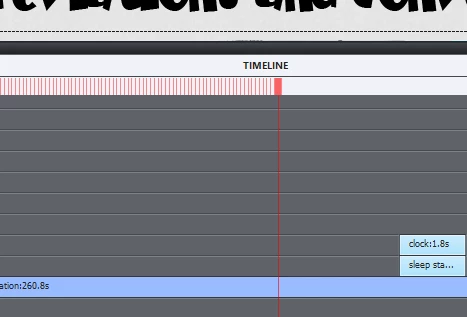
I'm having the same issue. Here is a screenshot of my undocked timeline. My mouse can't grab onto the playhead so I can't scrub forward and backward!
    This topic has been closed for replies.
    Correct answer Paul Wilson CTDP

    I have the same issue. Do you have multiple monitors? I seem to recall reporting this as a bug several versions ago (still not addressed), but I remember something about it being related to having two or more displays. The only work around that I have found is to jiggle the timeline scrollbar a little to get it to return.

    3 replies

    Paul Wilson CTDP
    Community Expert
    Paul Wilson CTDPCommunity ExpertCorrect answer
    Community Expert
    August 19, 2017

    I have the same issue. Do you have multiple monitors? I seem to recall reporting this as a bug several versions ago (still not addressed), but I remember something about it being related to having two or more displays. The only work around that I have found is to jiggle the timeline scrollbar a little to get it to return.

    Paul Wilson, CTDP
    rgurule
    rguruleAuthor
    Inspiring
    August 21, 2017

    Hi Paul, 

    I don't use two monitors (although it would be nice). I just upgraded to a pretty sweet PC, so I doubt that any system limits are the cause. Some days it is worse than others. I'll check back in if I ever figure it out. 

    Paul Wilson CTDP
    Community Expert
    Community Expert
    August 21, 2017

    Sorry, I don't have a better answer. Best of luck.

    Paul Wilson, CTDP
    Lilybiri
    Legend
    August 16, 2017

    You seem to use very long slides, something I try to avoid whenever possible. Is there a reason for those extreme long durations? Only reason could be long VO, in which case I would recommend to split up in multiple slides.

    One of the reasons for this recommendation: as a former professor my focus is on the learner. With very long slides, when the learner wants to review something ob a slide he will have to wait until exactly that moment appears, he has to sit throughout the whole slide and that can be very frustrating with slides of several minutes. Whe you see that the default duration of a slide is set to 3 seconds, that is one of the reasons. Offer as much control to the user as possible. That is much easier when you allow free navigation and shorter slides, than having to creeate controls on long slides.

    Even for multislide synchronized videos I would not use too long slides.

    This may seem bit off topic, but I wonder if those long slides are one of the causes that you do experience this problem, I don't? It is a refreshing display issue, can also be dure to hardware limitations of course but refreshing a very long timeline?

    Which version do you use?

    It has been quite a while since I experienced this problem, I think almost never in CP9 nor CP2017

    BTW: I branched your question to a new thread, because the other thread dated from 2011.

    rgurule
    rguruleAuthor
    Inspiring
    August 18, 2017

    Yes I do have long slides! Mostly due to long voice over. Good point about the UI. Up to this point, the decision to make a new slide has seemed rather arbitrary.

    Version:

    9.0.2.437

    Lilybiri
    Legend
    August 18, 2017

    Fine that you use the latest version of 9.

    Thanks for accepting my recommendations, based on many years of experience with Captivate (use it since version 1).

    Please try it out, to see if you still have the same issues with the display refresh of the timeline.

    BTW I posted a sequence of 5 articles aout the Timeline, maybe you could pickup some tips. Here is one link:

    Pausing Captivate's Timeline - Captivate blog

    rgurule
    rguruleAuthor
    Inspiring
    August 16, 2017

    Actually this happens very frequently...here's another

    AnitaHorsley
    Inspiring
    August 19, 2017

    This happens to me too, if you use the scroll bar at the bottom of the timeline (not the zoom) and move to the left and right, you can get your ruler on the timeline back.