
Inspiring
September 5, 2012
Question

Total interface design in Captivate, not just "PPT slide"?

  • September 5, 2012
  • 1 reply
  • 1078 views

I'm reviewing the possibility of using Captivate for a major project (>$200K). i've looked at the tutorial videos but....

1. All the info is slanted at creaintg PPT-type slides for content.

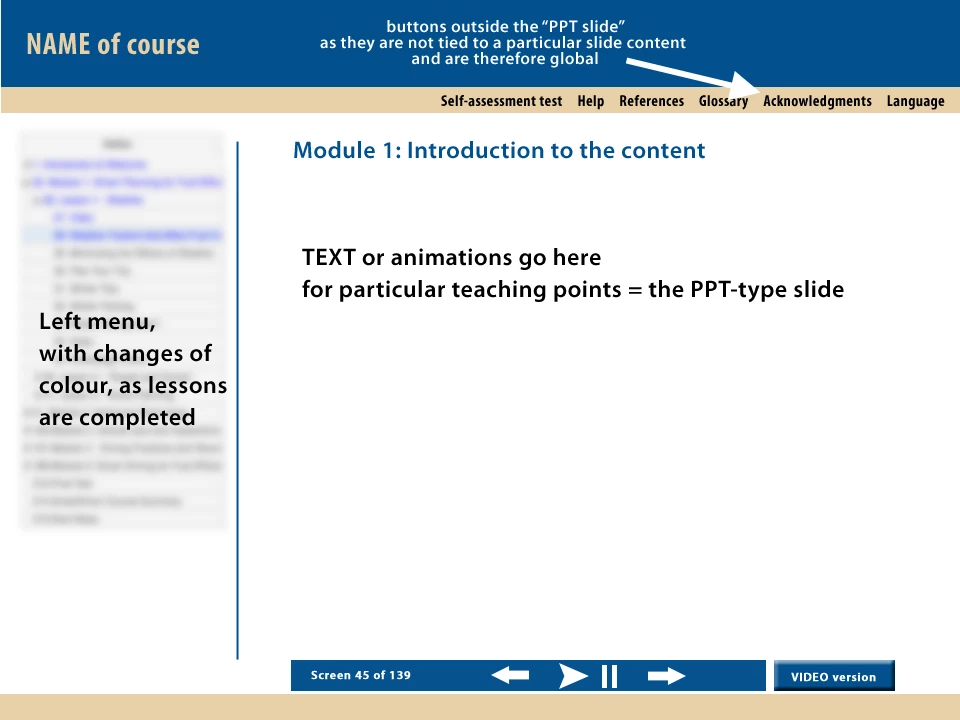
2. For the purposes of this post, an e-Learning site is composed of : a banner header, a left menu, a content area and a navigation bar. So...

3. How do/ can you create a left menu which communicates with a SCORM-compliant LMS, to, for example, change colour for each menu item as each module is completed?

4. How do/can you create navigational elements OUTSIDE the PPT-type slide area, because they are meta-information not specific to a particular slide? For example: change language, references, glossary. These items should not be on a content slide, as they are global.

See attached image for what I want to do.

Any advice gratefully received.
    This topic has been closed for replies.

    1 reply

    VikramGaur
    Adobe Employee
    Adobe Employee
    September 10, 2012

    Hello,

    Welcome to Adobe Forums.

    You can use "Setting" button under TOC Editor in Adobe Captivate 6

    1) Under Captivate 6 Menu, click on Project -> Table of Contents

    2) Check "Show TOC"

    3) Click on "Settings"

    4) Make changes under "Theme" sections, Screenshot below :

    Note : I need to double check for Visited Links

    Please elaborate more on your 4th Point, do you want to have a different language TOC ?

    Thanks,

    Vikram

    djfilmsAuthor
    Inspiring
    September 10, 2012

    Vikram,

    Thanks for your post. Very helpful.

    I need to have a button which changes to French from English for the training module. As I noted, this functionality is not appropriate for a "slide", as it is global.

    regards

    David

    VikramGaur
    Adobe Employee
    Adobe Employee
    September 10, 2012

    Hello,

    You might need to create 2 seperate projects (English & French) and call the other project on that button click.

    Thanks,

    Vikram