
Participant
March 11, 2022
Question

Trouble downloading a trial version of captivate

  • March 11, 2022
  • 2 replies
  • 848 views

Hi,


Background info: I have recently started at a new company, who do not currently have a more robust tool to use to create e-learning courses. I want to download a trial, so I can test the functionality, and show a sample to "the powers that be", so that they can determine which tool, Captivate or Storyline will work best for them. 


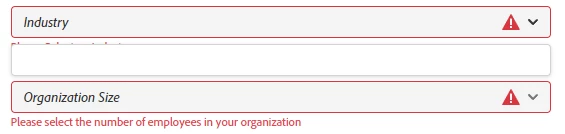
Issue: I cannot download the free trial. I have to use my personal login, because apparently free trials cannot be aquired if you have an enterprise account? However, it still asks for my organization, the industry and organization size. I can put in my organization, no problem (image 1), but nothing displays for the industry in the click down (image 2), nor the organization size. I cannot proceed without it, as it is required, yet there is nothing to select.


I like the description for the new functionalities that Captivate has since the last time I used it, but I will not be able to recommend it without visually showing a sample from both products. 


Thanks for your help,

Mary

image 1:
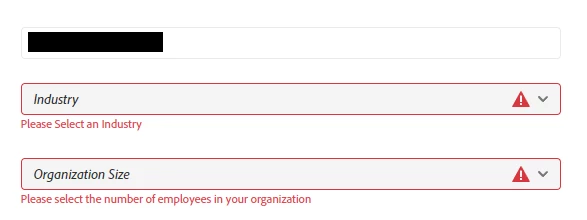
 

image 2: 
    This topic has been closed for replies.

    2 replies

    Participant
    March 16, 2022

    I am also experiencing this problem and have tried to access the trial via both Chrome and Edge with no luck.

    Have you been able to find a solution?

    RodWard
    Community Expert
    Community Expert
    March 16, 2022

    You generally need to have an Adobe ID in order to use Captivate (even for a trial version).  Getting an Adobe ID is free, but this is how Adobe controls their app licensing.  After the trial period runs out, if you want to keep using the product you will need to purchase a subscription.  Then the subscription is attached to your Adobe ID.


    This information might help:

    https://helpx.adobe.com/au/x-productkb/global/update-operating-system-and-browser.html

    (This is for AFTER you get Captivate installed, if you run into the Update Your System OS issue.)

    Lilybiri
    Legend
    March 11, 2022

    Very annoying, I know, cannot even tell how many times I have to fill in that same form which is not only appearing when downloading a trial verions.

    However it is not clear why you cannot even fill in those fields? You can put in 1 for the organization size but you tell that you don't get a dropdown list at all for either fields? 

    What was the last version of Captivate you have used in the past? There are plenty of published output and cptx-examples in the eLearning community. Not only from the Adobe team, but lot of other Captivate users. Not all are great, but that is normal in a user community. It is not solving your issue however. If you cannot reach Adobe Help, I will try to find a staff member who could probably help you better. I am just a user.

    Participant
    March 18, 2022

    Unfortunately no, it acts like a drop down for the org size as well. I have tried in Chrome and Edge and double checked that they are the most up to date that they can be.


    The thing that is funny about it, is that I am logged in as myself, you would think if you were logged in you wouldnt have to fill out a form, but maybe I am just not thinking about it logically. 


    It was in 2014 that I last used Captivate. I am not sure which version that was. My last employer's client preferred Storyline. 


    Thanks for the feedback about the examples. I can have that as a back-up. I think it would mean more to them to see their own content expressed, but you do what you gotta do. 

    Lilybiri
    Legend
    March 18, 2022

    Very strange indeed. Edge and Chrome are also the browsers I have used. Do you have a CC account? 

    Whow, you are in for a lot of surprises, because 2014 will have been version 6.  You may have a look at my blog, where I posted a lot of use cases and tutorials about the most recent version which is 11.5 or 11.8. That version 11.8 doesn't have new features but was necessary to cope with M1 chip and Monterey for the Mac users (and Win11 for the other users) but I didn't install it yet. It is available only as subscription license.

    As for those forms, I need to fill in to watch the recording of presentations/workshops I presented at Adobe conferences. It cannot get any weirder.... And I have only one Adobe ID. It has been a lot of years I cut off my logical mind in dealing with those situations.