
Question
Truncated text in matching questions when publishing to HTML5
The options of the matching questions are getting truncated at the top of each letter after I pubish to HTML5. Ive' tried resizing the text on the slide, modifying the style in the object manager, changing the text alignment (left, right, center, middle, bottom, top) and nothing seems to work.
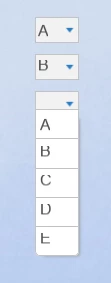
It seems that each letter in the HTML5 output and png files and each image is truncated at the top. I tried to find the PNG files in the HTML output but I don't see them.
Any ideas of what is causing this and how I can resolve it so the text is not truncated?
 AdChoices