


- Home
- Captivate
- Discussions
- Re: Unable to download Character Assets in Captiva...
- Re: Unable to download Character Assets in Captiva...
Unable to download Character Assets in Captivate 2019

Copy link to clipboard
Copied
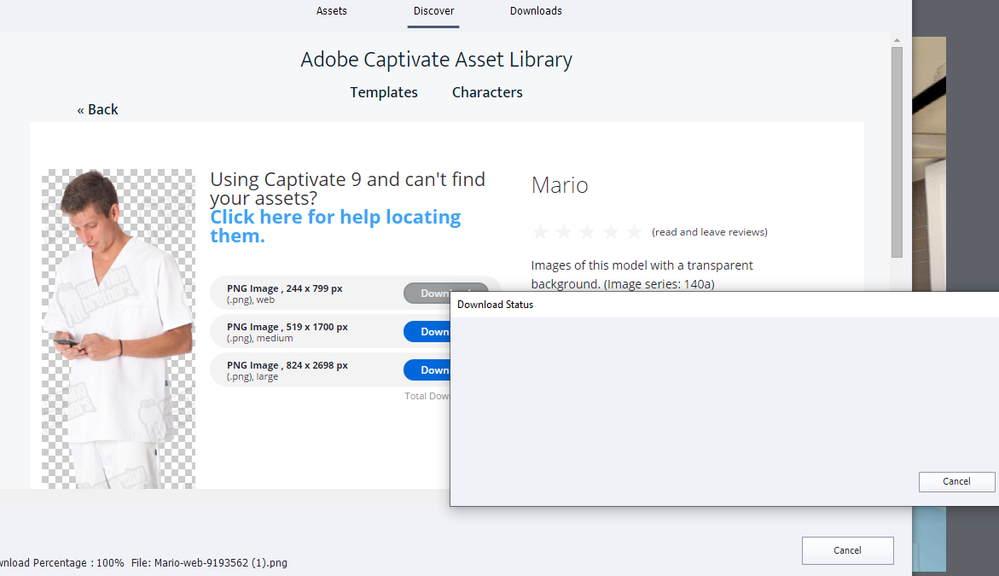
I just installed a fresh copy of Captivate 11.5 and when I try to download charactor assest, a blank download status window pops up but the system freezes and it doesn;t work. I tried looking for other posts about this issue and I found one that said to clear the 11_5 character folder and run a "Clear Preferences" file but unfortunately that didn;t work either.
Can anyone please tell me if they were able to figure out how to fix this?
Thanks.


 5
Replies
5
5
Replies
5


Copy link to clipboard
Copied
Did you check this post by a staff member?
Copy link to clipboard
Copied
Thanks for replying. Yes, I followed these directions but it didn't work. The version that I installed was already the latest so after deleting the folders in these instructions, Captivate wouldn't allow me to update. Losing those foldes caused me problems using the entire tool so I had to re-install from scratch again and it still won't let me download characters unfortunately.
Copy link to clipboard
Copied
That is weird, because those folders are totally separate from the installation folders. Deleting one of them while Captivate is closed, only causes a recreation of a fresh folder without corruption.
When you re-installed did you not forget to Clean the Preferences?
Copy link to clipboard
Copied
I tried deleting the folders then downloading a character again and it worked this time!!
Thank you so much, you are my virtual hero!
Copy link to clipboard
Copied
Thanks for this feedback. Lot is virtual at this moment... Sometimes insisting can be rewarding, isn't it?


Find more inspiration, events, and resources on the new Adobe Community
Explore Now
 AdChoices