
Participating Frequently
December 19, 2011
Question

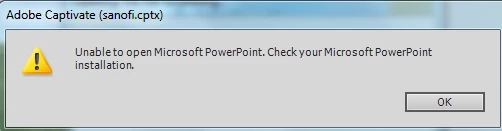
Unable to open Microsoft Powerpoint. Check your Microsoft Powerpoint installation

  • December 19, 2011
  • 1 reply
  • 2387 views

This is the message I get when I try to edit powerpoint 2007 files. I also can't import PPTX files into Captivate 5.5 (only PPT - Powerpoint 2003 version files)
    This topic has been closed for replies.

    1 reply

    Anjaneai_Srivastava
    Adobe Employee
    Adobe Employee
    December 19, 2011

    Hi,

    What is the version of Powerpoint(MS Office) installed at your end?

    Also Try keeping MS PPT running in the background when you try the Edit with PPT.

    Please verify the version as per scenarios described here--

    http://help.adobe.com/en_US/captivate/cp/using/WS5b3ccc516d4fbf351e63e3d119e9582981-7fe4.html

    Can you give a shot with a New Project then try Importing and Edit With MS PPT?

    Also test with a different presentation file (wither PPT or PPTX).

    Thanks,

    Anjaneai

    RifortesAuthor
    Participating Frequently
    December 19, 2011

    Hi Anjaneai: thanks for your reply. The version of MS PowerPoint is 2007 (Portuguese Brazil Version) 12.0.6654.5000. I have tried the steps you suggest but still can't edit from Captivate (only at MS PowerPoint then updating in the library)

    Thanks,

    De: Anjaneai Srivastava

    Enviada em: segunda-feira, 19 de dezembro de 2011 12:34

    Para: Rifortes

    Assunto: Unable to open Microsoft Powerpoint. Check your Microsoft Powerpoint installation

    Re: Unable to open Microsoft Powerpoint. Check your Microsoft Powerpoint installation

    created by Anjaneai Srivastava <http://forums.adobe.com/people/Anjaneai+Srivastava> in Adobe Captivate - View the full discussion <http://forums.adobe.com/message/4093252#4093252