
Unable to open projects from Captivate 2019
A few of my coworkers just installed Captivate 2019. I'm using Captivate 2017. Unfortunately, I'm unable to open any of their projects to collaborate or review. I get the attached error message on every project I've tried to open from three different people using Captivate 2019. Is there something that they need to do to make their projects compatible with Captivate 2017? Or is there something I should do to open those projects? To clarify, they can each open the projects without any issues. Only I am unable to open the project files.
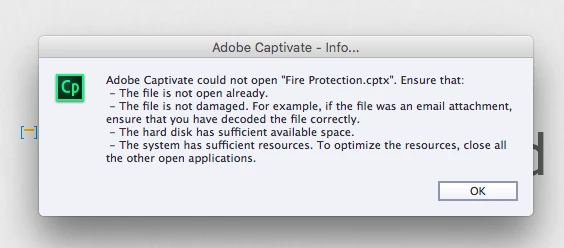
The file is not open elsewhere. It works fine for users of CP2019, so I assume it isn't damaged (it wasn't sent as an attachment). My hard disk has approximately 60GB of free space. Resources are not an issue, I have 16GB RAM and I'm running Outlook and PowerPoint in addition to Captivate.
Only difference, other than Captivate version, is that I'm using a Mac and the other users are using Windoze. Could that be the issue? I don't have that problem with files from people using CP2017. Those open fine, and those were created on Windows computers.
TIA!
 AdChoices