
Varied Video Publishing Results in SCORM 2004
I am using Captivate 8 on a Windows 7 machine.
I published a file to SCORM 2004 3rd edition in both SWF and HTML for a customer. This file has an mp4 video inserted as a progressive download video type. The customer was receiving an error when uploading the published zip folder to their LMS - specifically calling out the imsmanifest and the video file. I blacked out any information regarding the customer, but this is the error they received in Cornerstone:
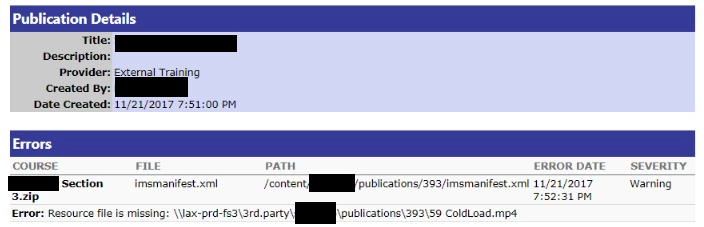
I opened up the zip folder I sent the customer. The video file was placed into a folder called vr, so it did exist as an asset. I then took a peek in the imsmanifest to check the links to the video. There were two references to the video file:
--one that points to the video being in the root folder (which it wasn't)

--and one that correctly points to the video being inside the vr folder

I corrected the folder location for the first link in the imsmanifest, packaged it back up, sent it to the customer, and everything uploaded perfectly.
Thinking that maybe there was just a problem when I published the file, I republished and got the same incorrect linking. I then updated the video file in the library before republishing, and this time the video was placed inside both the root folder and the vr folder - the imsmanifest was then correct. Why does it need to publish it twice?
I was curious to see if other files did anything weird using the same publishing settings, so I published another file with the same video type - progressive download - (though f4v instead) and checked its output. The f4v video was renamed to vi1 and exported as an mp4 - it pops open the media encoder while publishing, so I figured that the renaming was normal. The imsmanifest correctly pointed to the renamed mp4 video inside the vr folder. There were no f4vs in the zip or the imsmanifest.
I checked a third file, again with f4vs as progressive download video types. This output saved both the f4v and the exported mp4 files (with their original file names) in the vr folder and the imsmanifest points to both video types - all within the vr folder.
I never would have looked into this if my customer's system hadn't popped up an error... Any ideas why Captivate publishes each file so differently (the settings are all identical, barring the actual videos) - or why it dropped a file in the first place - or why it duplicates them sometimes? My plan is to replace all of our older f4vs with mp4s, but if there is a possibility that they won't publish correctly, I'm a little nervous that I'll have to go in and check the imsmanifest on everything I publish. (Yikes!)
I appreciate any incite on this!
Thank you,
--Crystal
 AdChoices